Developer Guide 1 — Getting started: build a small app end to end
Sibling guides: dev-2-recipes.md · dev-3-services-directory.md · dev-4-api-and-mcp.md · dev-5-flows-connections-expressions.md · dev-6-refusals-troubleshooting.md.
D1.0 The idea, in five lines#
You do not write the app. You describe it as typed artifacts (Entity, Form, Decision, Flow, Process…) in the Workbench; each control you click is a typed tool call to the Kernel (an event store), and a generator turns the artifacts into a Next.js app plus a deployed process. generated/ is output: never hand-edit it. See Part 2 for the vocabulary.
In this tutorial you build a loan check:
| You make | Name used below | What it does |
|---|---|---|
| Workspace + Dev environment | Tutorial WS |
who may do what, and where it runs |
| App | Loan Tutorial |
the container |
| Entity | Loan application |
the table |
| Form | Loan application form |
the start/task screen |
| Decision | Loan approval |
loanAmount at most 1,000,000 gives auto, else review |
| Flow | Loan check |
runs the decision behind an API endpoint |
| Process | Loan application process |
start, user task, service task (calls the Flow), gateway, two ends |
The names are the journey's (NAMES in journey-builder.spec.ts); use others if you like.
D1.1 What must be running#
The full list, ports and start commands live in dev-3-services-directory.md; do not duplicate them here. For this tutorial you need, at minimum, everything the journey touches:
| Needed for | Service | Source of the port |
|---|---|---|
| Event store and the app's data | Postgres :5437 | CLAUDE.md |
| Sign-in | Keycloak :8095 (a builder account, and an end-user account in realm oneweb) |
journey-builder.spec.ts |
| The Kernel facade | :4600 (the dev launch config), with its deployer (the facade starts one) | Part 8 §8.1, Part 7 §7.2 |
| The Workbench | shell :3000, designers built and served (pnpm --filter <pkg> build, never rsbuild dev) |
Part 8 §8.1 |
| Secrets | OpenBao :8200 (npm run vault:up) |
CLAUDE.md |
| Processes | the BPM engine :8889 and its store at :5432 (the 5.0 reference stack) | DEV_SERVICES in the journey |
| Run history | Jaeger OTLP :4318, query :16686 | DEV_SERVICES |
| Mail (optional here) | Mailpit :8025 | Training Day 1 Lab 2 note |
Two accounts: a builder who can change designs and promote (the journey uses a fixture account of the build realm), and an end user in realm oneweb who holds the role the user task will be assigned to (the journey uses uwcredit1, which holds credit-officers only). Creating them is done by provisioning scripts the journey names (provision-workbench-identity.js, provision-loan-origination-identity.js); I did not read those scripts, so how to run them for your machine is (not verified): ask whoever set up your stack, or see dev-3.
Rebuild all 6.0 state from seed scripts with cd kernel-poc && npm run restore (Part 8 §8.1). On a fresh git worktree, copy the gitignored local secret files first (Part 8 §8.1).
D1.2 Sign in, make a workspace#
Click: open the shell (http://localhost:3000), press Sign in, and log in on Keycloak's own page as the builder. Home greets you by name. Then account menu (avatar) → Manage workspaces → + New workspace → type a name → Create. Open the workspace card → Environments tab → in Add an environment type Dev → Add.
Tool: workspace_create with starterAccess: true (the Workbench sends it), then workspace_add_environment.
starterAccess defines six default roles (workspaceAdmin, appOwner, opsEngineer, riskOfficer, builder, viewer) and binds you, taken from your signed-in session and never from an argument, as workspaceAdmin (kernel-poc/src/tools/workspace.js). Without it a new workspace has no roles and nobody can manage it while bindings are enforced. Check: account menu → People & access → Roles shows the six roles.
D1.3 Make the app#
Click: Home → + New app → name it → it says "in the workspace Tutorial WS" → Create. You land on the app's project page (tabs: Artifacts, Environments, Access…).
Tool: kernel_import_artifact (kind App) and app_set_workspace, in one composition so Undo reverses both (console-workspace/src/home.tsx). There is no app_create.
Give it an address in Dev (a deploy needs it, because the engine calls the app's flows there). Account menu → Manage workspaces → your workspace → Environments → App addresses: fill Where it runs (host) with localhost:<free port> and Where the engine calls it (compose) with host.docker.internal:<same port>, then Save address. Pick a port nothing else uses. Tool: workspace_set_environment_network. The compose view exists because the BPM engine runs in Docker and reaches the app at a different address (Training Day 1, Lab 2).
D1.4 Data model (Entity)#
Click: project page → Artifacts → + New → Kind Data model → Name Loan application, Table name loan_application, First column id, Its type Unique id (UUID) → Create (the Data model designer opens). In the right panel open Add a field and add, pressing Add field each time:
| Name | Type (as labelled) | Tick |
|---|---|---|
applicantName |
Text | Required |
loanAmount |
Decimal number | Required |
applicationDate |
Date | |
loanType |
Text |
Then clear the selection, open Primary key, and choose Key field id.
Tools: entity_create (from + New; the catalog is sdk/src/new-artifact.ts), entity_add_field per field, entity_set_primary_key. Editing a field later is entity_set_field, which reports safe / unsafe / blocked for your database before saving (Training Day 1, Lab 3 shows the screens).
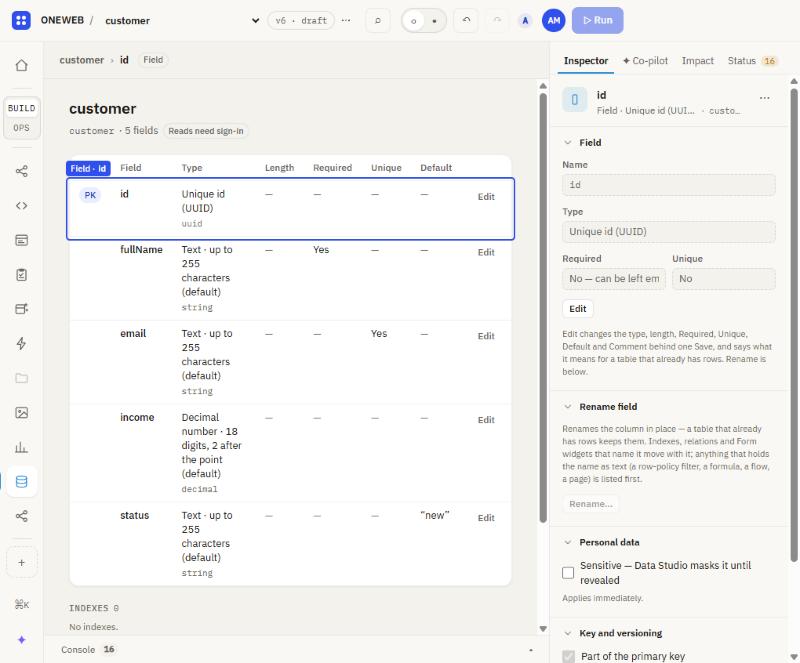
Wording difference: Training Day 1 says to tick Part of the primary key on a field; the journey uses the Primary key section's Key field choice. Both may exist in different builds (not verified which your build shows).
D1.5 Form#
Click: + New → Kind Form → Name Loan application form, Data model Loan application → Create. In the Outline a block bound to the entity exists. Click the block; under Fields, for each of applicantName (Text box), loanAmount (Number), applicationDate (Date) choose Entity field, Field type, then Add field. For each widget: select it in the Outline → Basics → Label → Save basics. On loanAmount: Number format → Currency, Currency THB, Max decimals 2 → Save number format; Validation → Add a rule range, Min 10000, Max 5000000 → Add rule → Save validation. On applicantName: Validation → tick Required → Save validation. For how numbers and dates read, deselect, open the Text tab → Region th-TH → Save region.
Tools: form_create, form_add_block (only if the block is not already there), form_add_widget, form_set_widget_label, form_set_widget_config (number/date format), form_set_validation, form_set_number_locale. All confirmed as call sites in designer-forms/src/plugin.tsx; which control calls which is by name match and purpose (not traced line by line).
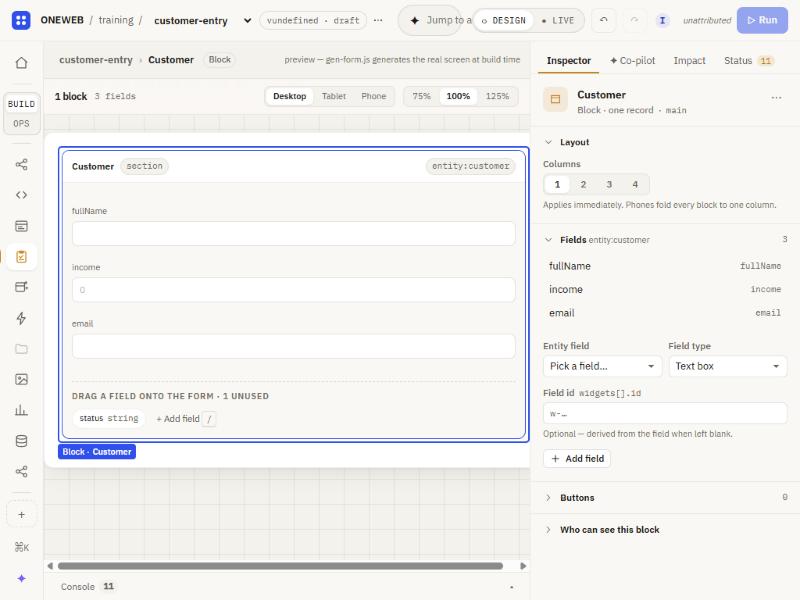
Formats come from the Form, never from hard-coded locales in the generated app. The journey also adds a loanType dropdown and two master-table dropdowns; skip those on a first pass.
D1.6 Decision, with a test#
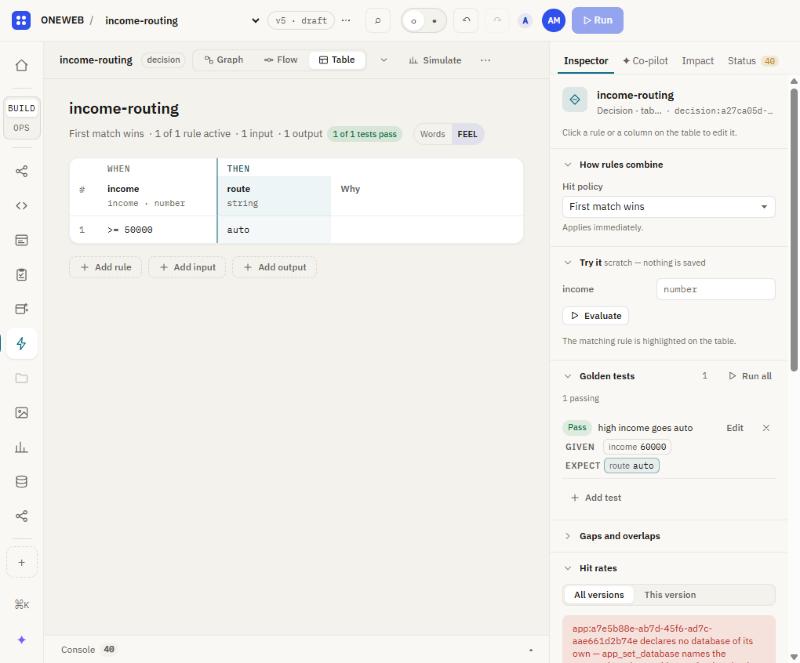
Click: + New → Kind Decision → Name Loan approval → Create. A new Decision has no inputs or outputs. Under the table press Add input (Name loanAmount, Type number, Add input) and Add output (Name route, Type string). Press Add rule: Rule id small, loanAmount is at most 1000000, result route = auto, Add rule; again with large, is more than 1000000, review. Select empty canvas so the inspector shows the Decision; in Golden tests press Add test twice (500000 expects auto; 2000000 expects review), then Run all: it should read "2 passing". The stored table rows are <= 1000000 and > 1000000 (asserted by the journey).
Tools: decision_create, decision_add_input, decision_add_output, decision_add_rule, decision_add_test, decision_run_tests (read-only).
D1.7 Flow (the callable service)#
Click: + New → Kind Flow → Name Loan check, Starts when Called by a process, a page or another flow → Create. In Runs on choose Node.js. In Variables add loanAmount (number, tick The caller supplies it (input)) and route (string, tick Handed back to the caller (output)). Press Add step: What it does Evaluate a decision, Name Approve?, Decision Loan approval. Then Add next step: Reply to the caller, Name Reply, HTTP status 200. Finally, with nothing selected, open Callable as: Method POST, Path /hooks/<something-unique>, Save endpoint.
Tools: flow_create then flow_set_runtime (engine: "node"; + New does this automatically via its then hook, because the schema default java runs nowhere), flow_add_variable, flow_add_step, flow_set_expose. The edge between the two steps is made by the same add-next-step action (the exact tool, flow_add_edge or flow_insert_step, is not traced: not verified).
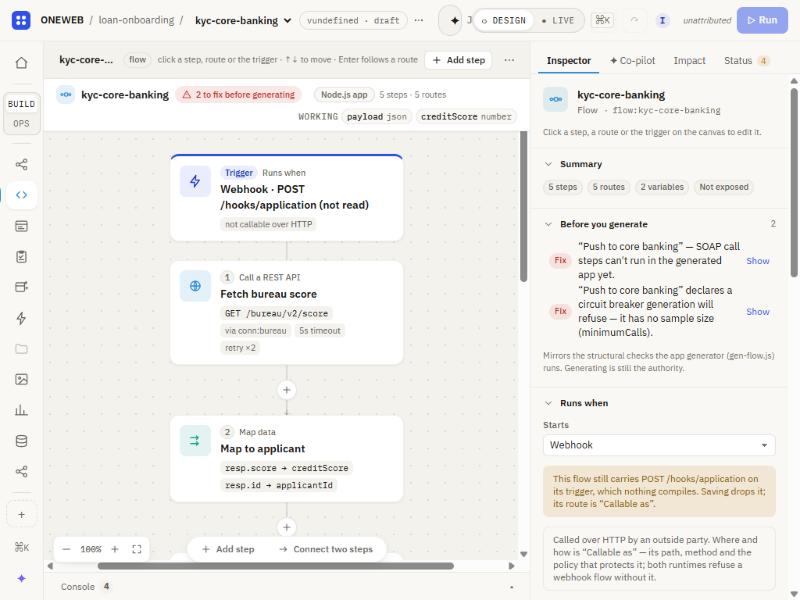
Flow details, connectors and expressions: dev-5-flows-connections-expressions.md.
D1.8 Process#
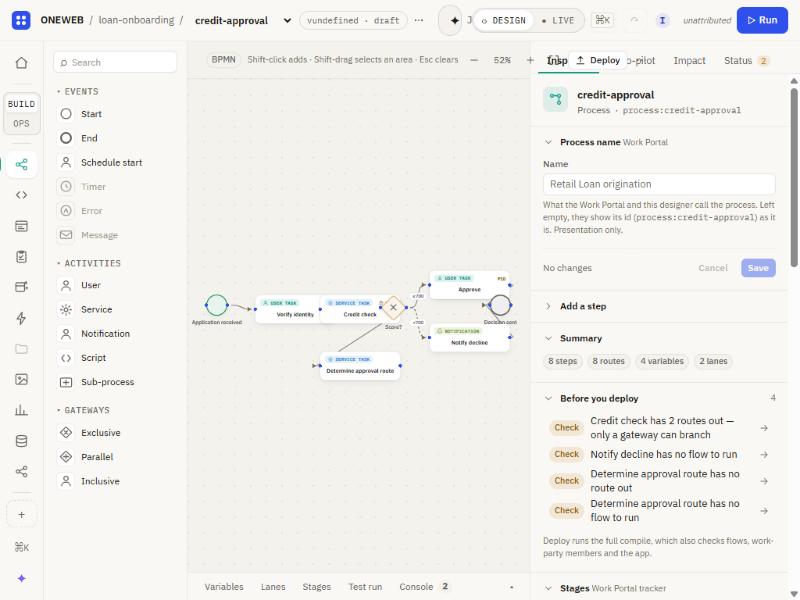
Click: + New → Kind Process → Name Loan application process → Create. It starts with a Start and an End, unconnected. From the palette on the left press Add User, Add Service, Add Exclusive, Add End (a second end). Menu More canvas actions → Auto-arrange, then Fit to view. Draw routes by dragging from a node's right dot to the next node's left dot: Start → User → Service → Gateway → End, and Gateway → the second End.
Configure each node (click it; the inspector changes):
- User task. Form the assignee fills in →
Loan application form. Under it the designer shows a start check; if it says the data model lacks the case-correlation field, press Add the correlation field. That addsbpmInstanceId(text) to the entity; the Work Portal's + Start a case needs it. Then Who does this work: Assignment Shared queue, Work party (role) a role from the list (the list is read from the Keycloak realm; the journey prefers a credit/loan officer role), Save who does this work. Deadline: Complete within2days. Optionally add a stage on the Stages tab and assign it. - Service task. What runs → Runs flow
Loan check→ Save what runs. In the Call panel the designer says "The flow never sets its output 'route'" and offers fixes: Create … variable(s), Protect it with an API key, Add the Map step that sets route. Press each. When it reads "Ready to deploy" you are done. The reason: a BPM engine service task can present only an API key, never an OAuth2 token or client certificate (CLAUDE.md, "A BPM engine service task can only present an API key"). - Gateway. In Routes out select each route. To the first End: Label on canvas
Auto-approved, Take this route whenroute == "auto". To the second End: Label on canvasNeeds review, tick Default route. Save each.
Tools: process_create, process_add_user_task / process_add_service_task / process_add_gateway / process_add_end_event (palette), process_add_edge (drag), process_set_form, process_set_assignment, process_set_sla, process_set_stages and process_set_node_stage, process_set_service, process_set_edge, process_add_variable. The Call panel's three fixes write a Policy and a Map step on the Flow plus process variables; which tools it uses is not traced (not verified). The Process inspector's Before you deploy list shows what is still missing.
D1.9 Publish, generate, key#
Publish. Open each artifact (Entity, Form, Decision, Flow, Process, the Policy the Call panel made, and finally the App through Open designer on its project page) and click the version chip in the header when its title says Click to publish. Tool: artifact_publish (sdk/src/lifecycle.tsx). The journey publishes the App too.
Generate. Project page → Environments tab → ▷ Generate app. The result says Where it went, which contains generated/<app key>. This is a Kernel facade route (POST /api/generate, which runs generate-app.js), not a typed tool. It refuses to write under a live next dev of the same app. The journey then builds a scratch copy with next build to prove it compiles; you can skip that.
API key. Open the Policy the Call panel made (it opens in the Integration designer) → API key section → the Dev row says "API key: not set" → Generate key — Dev → confirm. Tool: policy_generate_key; the key goes straight to the vault and is never shown. The confirmation also mentions npm run generate:app-env -- --env Dev; the journey does not run it, since a Deploy derives the app's env itself (Part 7 §7.2).
D1.10 Prepare Dev#
A deploy refuses, by name, anything unset. Open the workspace's Environments tab and read Runtime setup — Dev; each card says what is unset. The journey fills these cards (env_runtime_plan, read-only, lists the items):
| Card | You set | Tool |
|---|---|---|
| Services | keycloak http localhost:8095 / keycloak:8095; appdb localhost:5437 / appdb:5432; bpm-db localhost:5432 / oneweb-db:5432; bpm-engine http localhost:8889 / host.docker.internal:8889; jaeger-otlp http localhost:4318 / jaeger:4318; jaeger-query http localhost:16686 / jaeger:16686 (host / compose view) |
workspace_set_environment_network |
| Identity provider | service keycloak, Realm oneweb (issuer is suggested) |
same |
| Run history | export jaeger-otlp, query jaeger-query |
same |
| BPM engine | engine database (a Connection of kind Database, bound to bpm-db, login pasted write-only), then Engine API service bpm-engine, path /BPMREST, view compose; then Provision the engine client |
workspace_set_environment (engine database), workspace_bind_connection, secret_set, env_set_engine, env_provision_engine_client |
| App database | project page → Data Studio → Set up a database: pick server appdb, database postgres, Create the database Connection, then paste the owner login into the write-only box → Write to the vault |
app_add_database, secret_set |
These values are the journey's, for its dev stack (cross-check them against dev-3); use your own where your stack differs. The journey's Connection for the engine store uses server variable BPM_ENGINE_DB and secret reference vault:bpm-engine/db. Where the engine database login and the app database owner login come from is the project's config (bpmPgConfig, appDbConfig); never type a real password into chat or a doc.
Which tool each card calls is as listed in CLAUDE.md and the journey's read-backs; I did not trace each card's source (not verified for individual cards).
Who sits in the work party. Project page → Access tab → Work party members: Pick for your user task's work party, search the realm for the end user, press Pick app_add_first_member. This must happen before Deploy (see the note below).
The journey also sets an administrator role and a first admin on the same tab; that is for the admin portal and not needed for the case in D1.12 (not verified as optional: the journey does both before Deploy).
Deploy the process. In the Process designer press Deploy in the toolbar. The shell's Console tab says "deployed as engine definition version N" or "deploy REJECTED …". This calls the facade's POST /api/process/<id>/deploy, not a typed tool. The journey does this before the Deployment Center run; whether the Center's own processes step alone would suffice is (not verified).
D1.11 Deploy to Dev from the Deployment Center#
Click: project page → app tool Deployment Center. Environments & targets tab → Dev's card → Set target (the default kind, Local, is fine) → Save target. Tool: env_set_target. Back to Overview → New release → name → Create (bundle_create) → in the plan press Members and add the app with Add a member to this release (bundle_add_member; members must be published). The plan then shows a verdict, steps, blockers and a deployer indicator. Check that steps read "Set up app databases … Build apps … Provision app identity … Start apps". Press Deploy to Dev, then confirm in the dialog "Confirm deploy".
Tools: deploy_plan (read-only; gives a digest), deploy_start (re-plans, refuses if the digest moved, then queues a run), deploy_status, deploy_logs. Step order from Part 7 §7.2: preflight, set up app databases, build, migrate, identity, processes, flows, rollout, health.
Notes:
- Four-eyes on deploy. Off by default for an environment named Dev (and on elsewhere), so you, as the builder, can deploy to Dev. If it is on, your Deploy is dimmed and says who must do it. Setting: Runtime setup → Who may deploy (
env_set_deploy_four_eyes). - If the run queues forever, no deployer is alive; the plan says so. The facade starts one unless
KERNEL_DEPLOYER=off. - If it fails, read the failed step's log (
deploy_logs) and the refusal text. Common ones: dev-6-refusals-troubleshooting.md. - Prove the app is up:
http://localhost:<your port>/answers (the journey accepts any status below 400, or 401/403).
The 2026-11-05/06 journey runs and a past failure (undeclared decision-runtime variables, now fixed) are recorded in Training Day 2, Lab 7.
D1.12 Start and complete one case in the Work Portal#
Click: open http://localhost:<port>/portal. You are sent to the realm oneweb login page; sign in as the end user. Then:
- + Start a case (rail, tab bar or inbox button). If more than one process could start, choose yours. Fill the start form: applicant name, loan amount
500000, date. Press the start button. The portal returns to the inbox. - Open the new task (inbox, unclaimed view). A new task is Unclaimed: press Claim this task (the inbox preview also offers Claim and open).
- The task form shows what the start form stored. Step through any Next sections, then complete the task and confirm.
- Rail → Completed lists the finished task with its case reference.
Because 500000 is at most 1,000,000, the Decision returns auto and the gateway takes Auto-approved; the journey checks this by reading the engine's store: the instance ended at the Auto-approved end node (bpm.wf_t2_instance). Try 2000000 for a second case: it should take Needs review (the journey only proves the auto path; the review path is (not verified)).
What happens underneath: the portal writes to the BPM engine with a bpm-engine-caller token (OW_ENGINE_CLIENT_ID/SECRET); the service task calls your Flow's endpoint with the API key from the vault; the Flow evaluates the Decision.
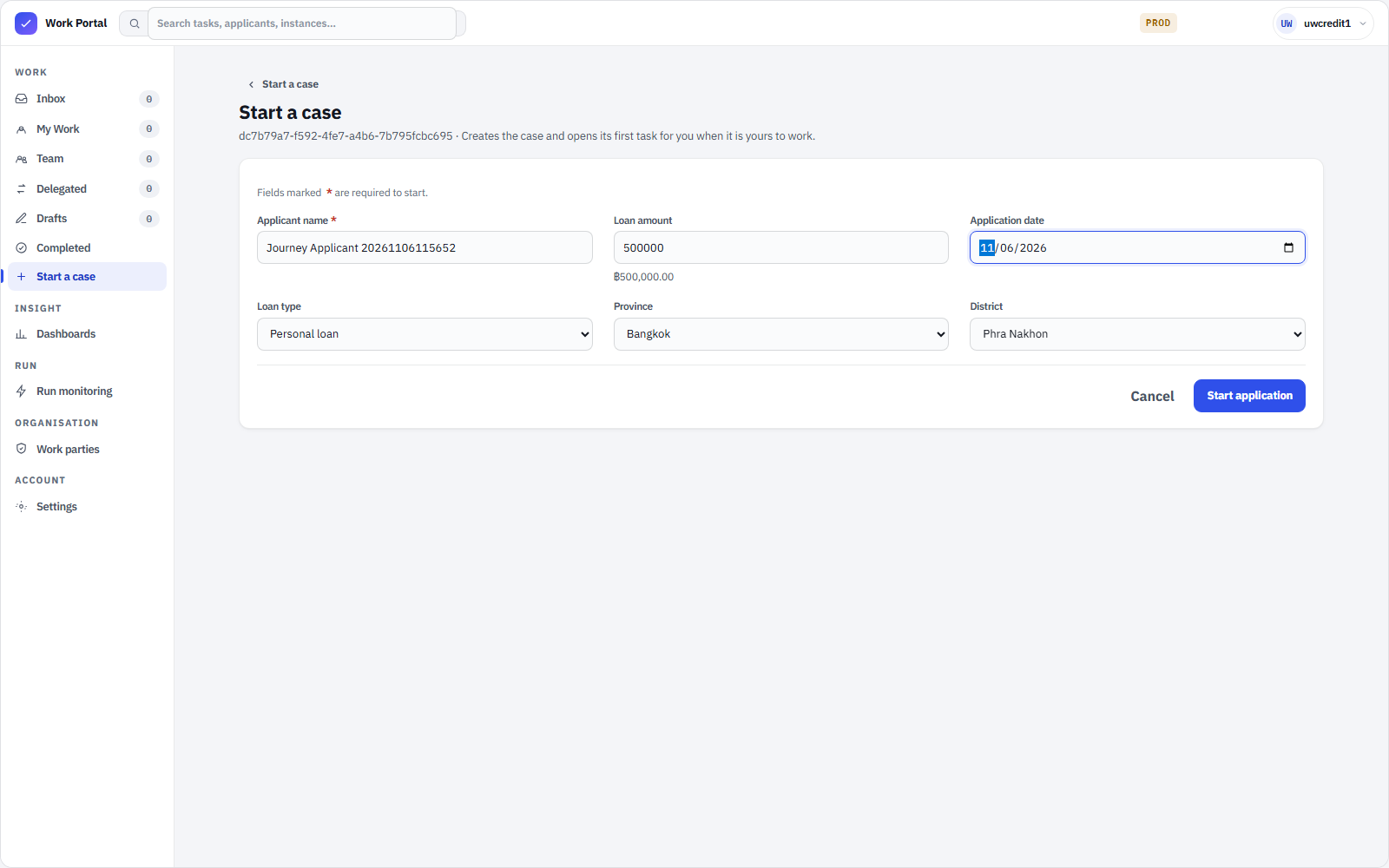
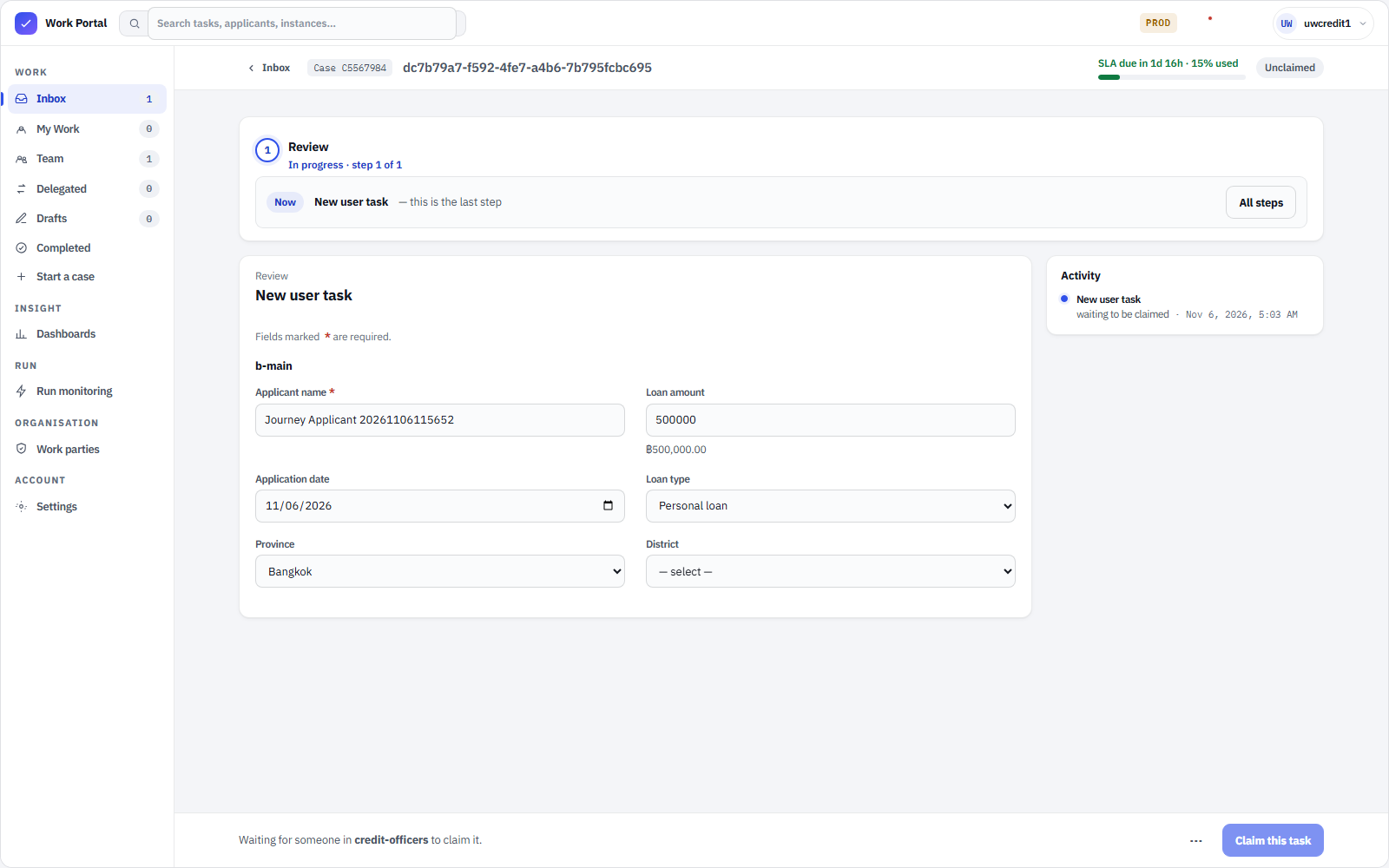
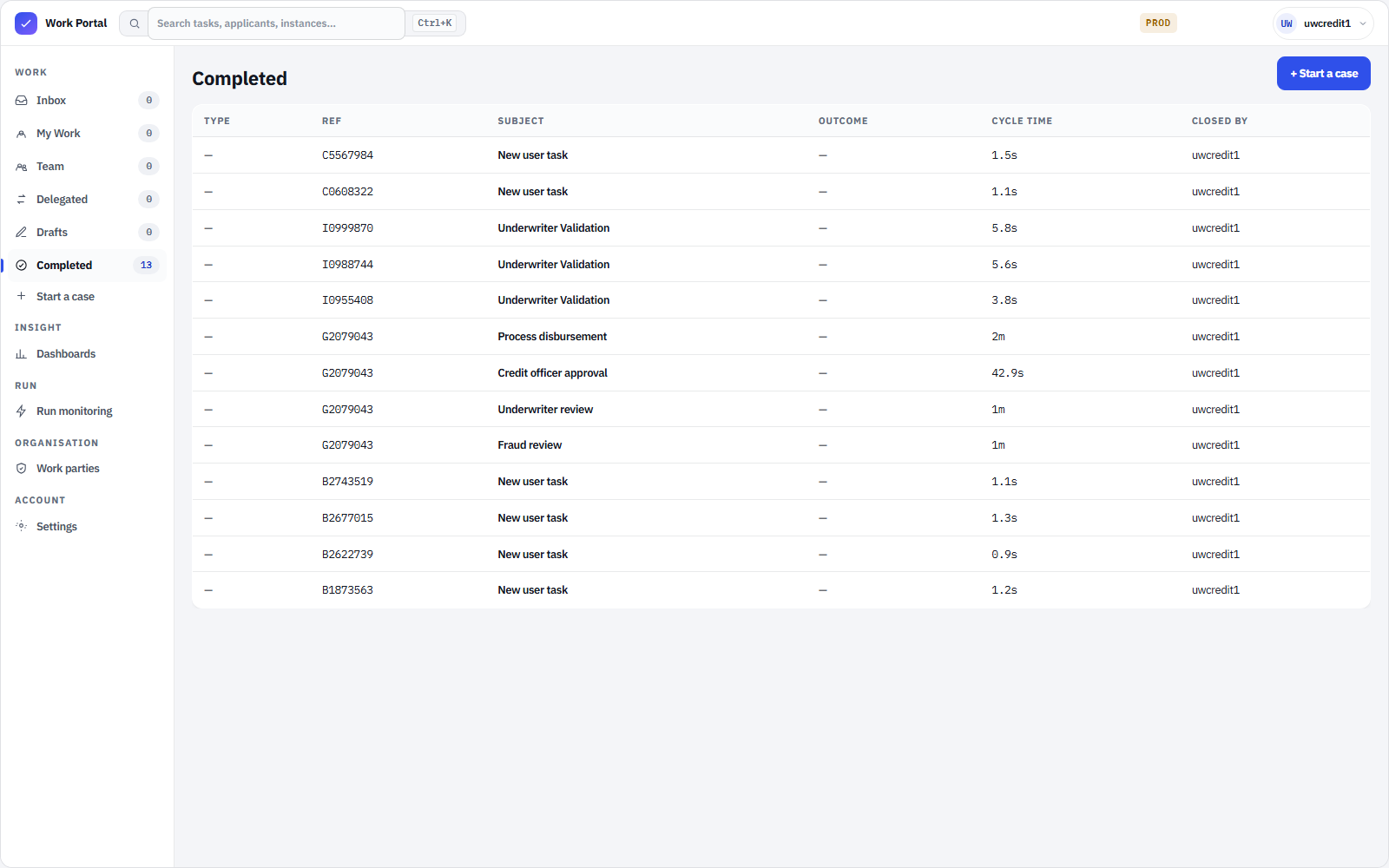
Screens are from the throwaway journey app (Part 7 §7.7).
D1.13 What you just touched#
| Step | Designer / console | Typed tools (main) |
|---|---|---|
| Workspace | Manage workspaces | workspace_create, workspace_add_environment |
| App | Home | kernel_import_artifact, app_set_workspace |
| Entity | Data model | entity_create, entity_add_field, entity_set_primary_key |
| Form | Forms | form_create, form_add_widget, form_set_validation, form_set_number_locale |
| Decision | Decision | decision_create, decision_add_rule, decision_add_test, decision_run_tests |
| Flow | Integration | flow_create, flow_add_step, flow_set_expose |
| Process | Process | process_create, process_add_user_task, process_set_service, process_set_edge |
| Publish | version chip | artifact_publish |
| Dev setup | Runtime setup | workspace_set_environment_network, env_set_engine, secret_set, policy_generate_key |
| Deploy | Deployment Center | bundle_create, bundle_add_member, deploy_plan, deploy_start |
The same tools are callable without the Workbench: dev-4-api-and-mcp.md. Full reference: Part 9 §9.2. Smaller task-sized recipes: dev-2-recipes.md.
D1.14 Not verified in this guide#
- How to create the builder and end-user Keycloak accounts on your machine (scripts named by the journey, not read).
- Whether Part of the primary key (Training Day 1) or Primary key → Key field (journey) is what your build shows.
- The exact tool behind the Flow's "Add next step" edge, and behind the Call panel's three fixes.
- Which tool each Runtime setup card calls, individually.
- Whether the Process Deploy button is required before the Deployment Center run, or the Center's processes step covers it.
- Whether the first admin and administrator role on the Access tab are required for a case to complete.
- The
reviewbranch end to end (onlyautois proven by the journey). - The inbox screenshot: Part 7 §7.7 records that its captures were defective, so none is shown here.
- No part of this tutorial was executed as I wrote it; the journey's last recorded full pass is 47 of 47 steps on 2026-11-06 (Part 7 §7.7), which proves the path existed then, not on your build.