Part 7 — Deploying and Operating
7.1 Environments and targets#
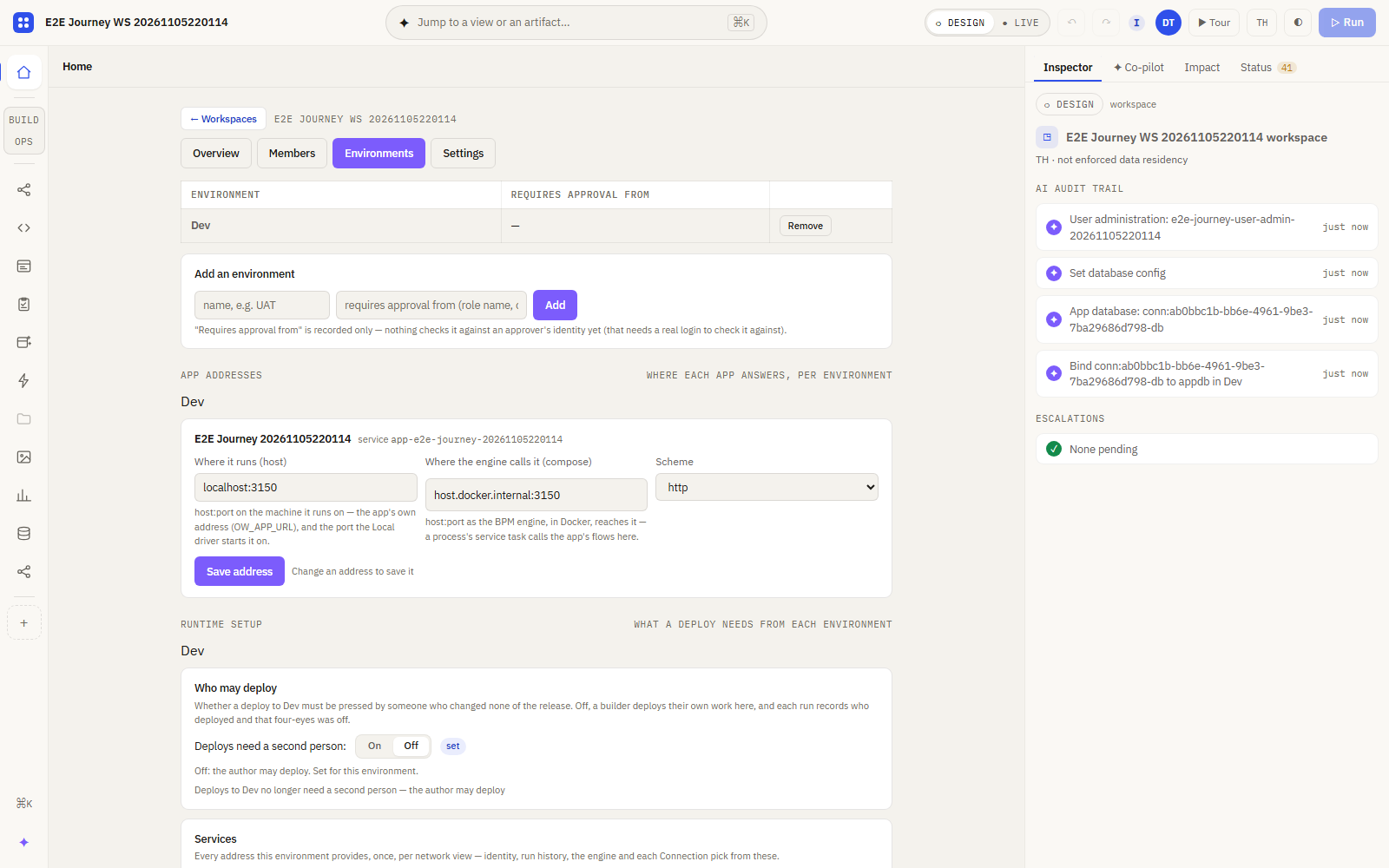
An Environment (Dev, Test, Prod…) belongs to a workspace and holds: app addresses, service bindings per network view, Connection bindings, identity, engine settings, the deploy target, approval rules and pipeline gates. The Environments tab has a "Runtime setup" block per environment that lists what is unset and what a deploy will refuse, in the deploy's own words.
| Target | State |
|---|---|
| Local | Apps run as host processes in .deploy/<ws>/<env>/{a,b}/<app> (blue/green slots), never in generated/ |
| Kubernetes / OpenShift | One image per app, Helm chart (Ingress vs Route), --atomic rollback |
| AWS | Blocked by name; no driver yet |
env_set_target sets it; env_test_target is "Test connection".
7.2 Deployment Center: plan, start, watch#
An observed failed run (builder-journey test, 2026-11-05). In an isolated workspace whose Dev environment was fully set up (services, identity provider, run history, engine and its keys, an app database), the run's steps were preflight succeeded, database succeeded, build failed, then identity, rollout and health skipped. The build step refuses before building anything: "the app's env cannot be derived — nothing was built, and nothing is started with a blank", naming each variable the app reads that nothing supplies. Here those were DECISION_RUNTIME_URL and DECISION_RUNTIME_KEY. The generated app reads them only to evaluate decisions on an environment's decision runtime and otherwise evaluates in-process, but the deploy treats any variable the app reads and nothing derives as required, and these two are not in its optional list (OPTIONAL_APP_ENV in deploy-app-env.js). This was a defect and is fixed (commit dff7d6f): both names are now optional for an app, since it evaluates decisions in-process when no decision runtime is declared, and an environment that does declare one still derives both. After the fix the same journey passed 47 of 47 steps, with the run's six steps (preflight, database, build, identity, rollout, health) all succeeding. A Kernel and deployer started before the fix must be restarted to pick it up. For any other name the same refusal still means: fill in Runtime setup, or put it in the environment's override file (.deploy/<workspace>/<env>/<app>.env.local).
What the screen shows (observed, read-only, 2026-11-05; no deploy was started). Open it from the app's project page (the Deployment Center tile) or the rail. It has an Overview and an Environments & targets tab. The overview lists notes such as "SIT has no target — Nothing can deploy there until it says where it runs", then a row per environment (for example Dev and Prod as Local, this host; others no target) showing what is running there and, for Prod, "Risk officer approves". Below are the Releases and, for the selected release, a tab per environment with its members. The Operations side (the OPS toggle) offers a Work Portal view (open tasks across processes and apps, with how many are past SLA; read-only) and an Operations view.
- Plan (
deploy_plan, read-only): units, changes, steps, gates, every blocker, and a digest. - Start (
deploy_start): re-plans, refuses if the digest moved, then queues a run (one active run per environment; Postgres only). - A deployer claims the run and executes steps through the target's driver. The facade starts one
automatically (
KERNEL_DEPLOYER=offdisables it); the Center shows whether one is alive. - Step order: preflight → set up app databases → build → migrate → identity → processes → flows →
rollout → health. Gate steps (
gate:<id>) are inserted as chosen. - History is two events:
deployment_startedanddeployment_finished.
Identity runs before the process deploy because the engine fixes a task's candidates when a process is deployed, so the first members must already be granted. A run lists only the steps its release needs (for example, no Build step when no app changes), and when the release includes Decisions served by an environment's decision runtime, a "Serve decisions" step runs between Flows and Rollout.
A run builds from the current version; a release pinning an older one is blocked
(pinned-not-current). A value nothing derives and no override supplies is refused by name before any
build, all at once.
App env is derived (deploy-app-env.js): Connections the app reads, issuer, address, sidecar key,
run history, policy keys, engine client, and DATABASE_URL from the app's own database, with secrets
read from the vault. A hand-written .deploy/<ws>/<env>/<app>.env.local is only optional overrides and
wins. npm run generate:app-env -- --env <env> writes the same block into a generated app's
.env.local; restart the app afterwards.
7.3 Four-eyes and approvals#
Four-eyes rules make sure the person who made a change is not the only person who approves or ships it.
| Rule | Meaning |
|---|---|
| Decision approval | An approval covers one sequence; its approver wrote none of the changes since the previous one. env_set_four_eyes makes an environment require it; deploy_plan blocks not-approved. |
| Deploy four-eyes | Someone other than the release's authors must press Deploy (bundle_release_gates). env_set_deploy_four_eyes sets it. Absent = OFF for an environment named Dev/Development, ON elsewhere. A decision approval never clears it. |
| Prod approval | approveProd verb; separation-of-duties warnings if one person holds conflicting roles. |
DevSecOps pipeline gates (G0 plan, G1 commit, G2 static, G3 supply-chain, G4 infrastructure, G5 test,
G6 dynamic, G7 release, G8 deploy, G9 operate) are chosen per environment in the Deployment Center
("Pipeline gates" on each environment's card; env_set_pipeline). Absent means no gates. They appear as
gate:<id> steps in deploy_plan, and so in its digest.
A release with no app to build has no Build step, and its build gates then follow the pre gates.
7.4 Rollback#
deploy_rollback puts back what served each app before a succeeded run: the other Local slot or the
previous Helm revision — never a rebuild. dryRun says what would happen. Hub flows roll back with
hub_rollback (Part 5). A driver refuses a run whose environment's target changed after planning.
7.5 App databases and Data Studio#
The deploy step "Set up app databases" runs before the build: it creates the schema and missing tables
as the owner, then the least-privilege reader (and writer, where no approval is required). The owner
login comes from the vault, pasted write-only in Data Studio's "Set up a database". Blockers:
database-not-ready, no-engine, engine-unresolved. Migrations are generated; blocked ones are
never emitted.
7.6 Operations consoles#
The consoles let operators watch runs, failed items and decision drift without changing the system by accident.
Three consoles, read-only apart from three confirmed actions.
| View | Shows |
|---|---|
| Flow runs | Run history from Jaeger; Replay (with plan and acknowledgements) |
| Failed items | Dead letters and failed files; Replay; Delete (reason required) |
| Decision drift | Board of monitored decisions with drift scores |
| Health & alerts | Whether the environment's telemetry answers, which alert rules are firing, and the silences in force (read-only; no acknowledge or silence button here) |
The Work Portal console and the Workspace console are separate (consoles listing in Part 4).
Health & alerts#
Pick an environment that has a metrics store bound (a picker appears when there are several). The view shows:
- Components. The stores and services health is judged from, worst first: metrics, the collector, run history, logs once bound, the Kernel, the deployer, the database and the brokers. A store that does not answer is shown as Not answering, never as healthy. Not bound and Not checked mean nothing is measured there, not that it is fine.
- Alerts. Every alert rule that the environment's published Monitors compile to, firing first. A row says whether it is firing, pending or quiet, and whether someone has acknowledged it or it is silenced. A rule that fails to evaluate is marked Rule failing: it is watching nothing.
- A selected alert shows what it watches, its route, when it began, who acknowledged it and any silence, and its runbook link.
If one of the three reads fails, the view says that part is not known beside the parts that did answer. It does not show an empty list.
Monitors: alerts, objectives and who is told#
A Monitor is where you say what to watch in a flow, when that is a problem, and who is mailed. Make one from + New → Monitor in an app; it opens in the Monitor designer.
- In the Monitor designer click Add a route. Choose the mail server, list who is mailed (one address per line) and tick the severities the route carries.
- Click Add an alert. Give it a title, choose A measurement crosses a limit, the flow, Error rate, a comparison and a limit (a ratio: 0.05 is five percent), how long it must hold (for example 10m), a severity and the route.
- Publish the Monitor from the status chip.
7.7 The Work Portal#
Generated per app. Officers see their tasks (work parties are read from current roles, not
frozen candidates), start cases ("+ Start a case" needs the correlation field), and complete tasks.
Writes to the engine need the bpm-engine-caller token (OW_ENGINE_CLIENT_ID/SECRET in the app's
env); without it every portal write fails closed.
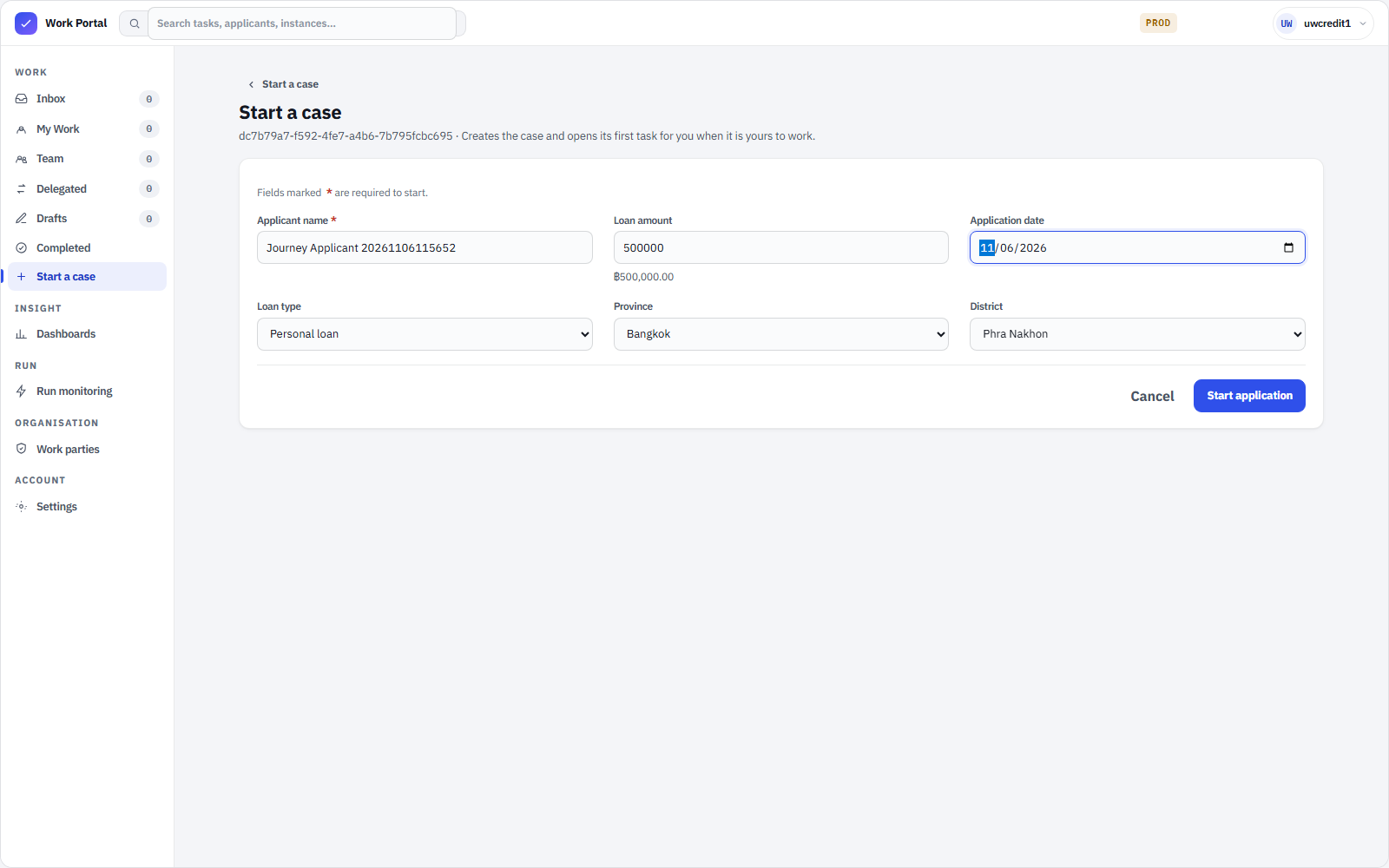
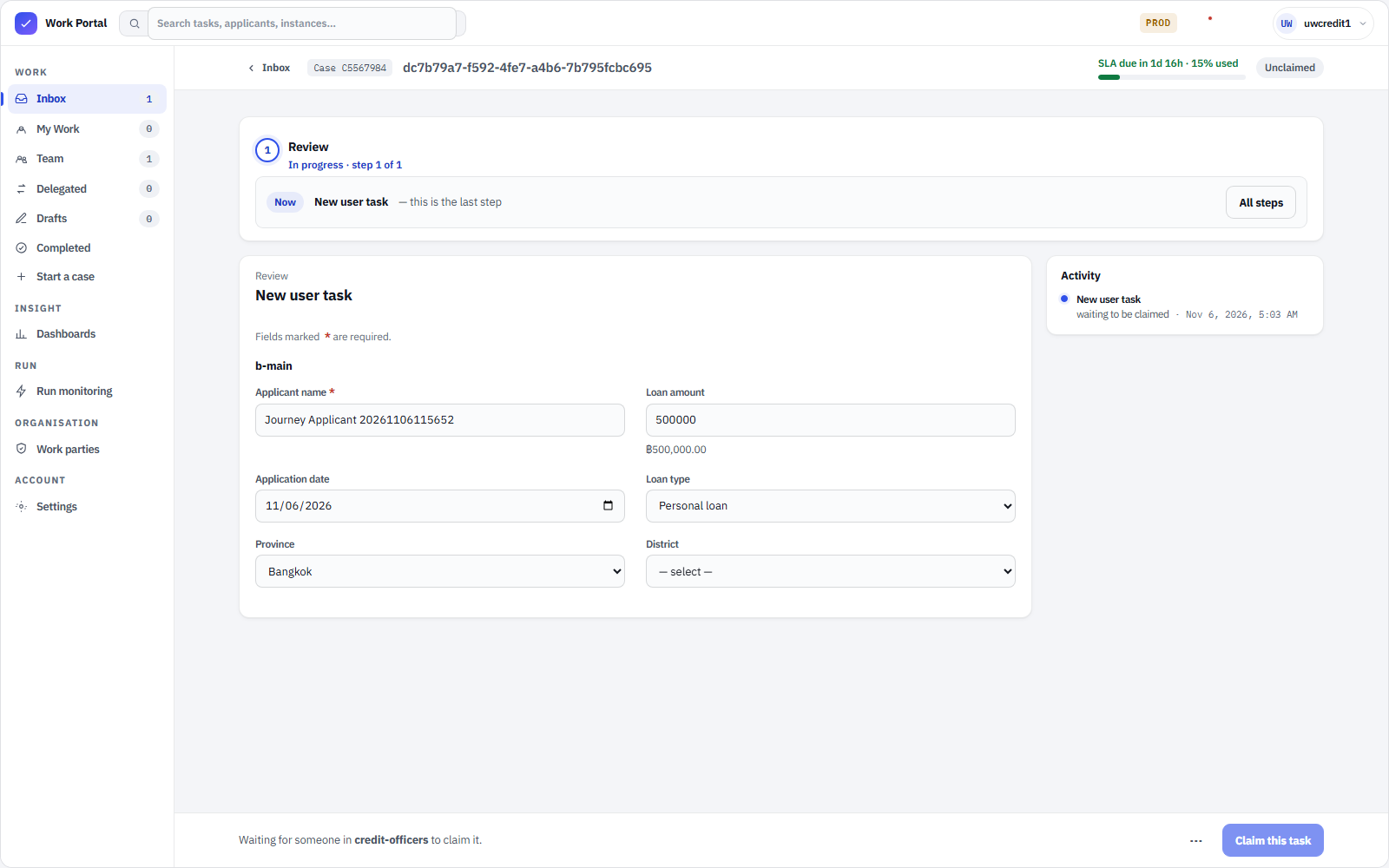
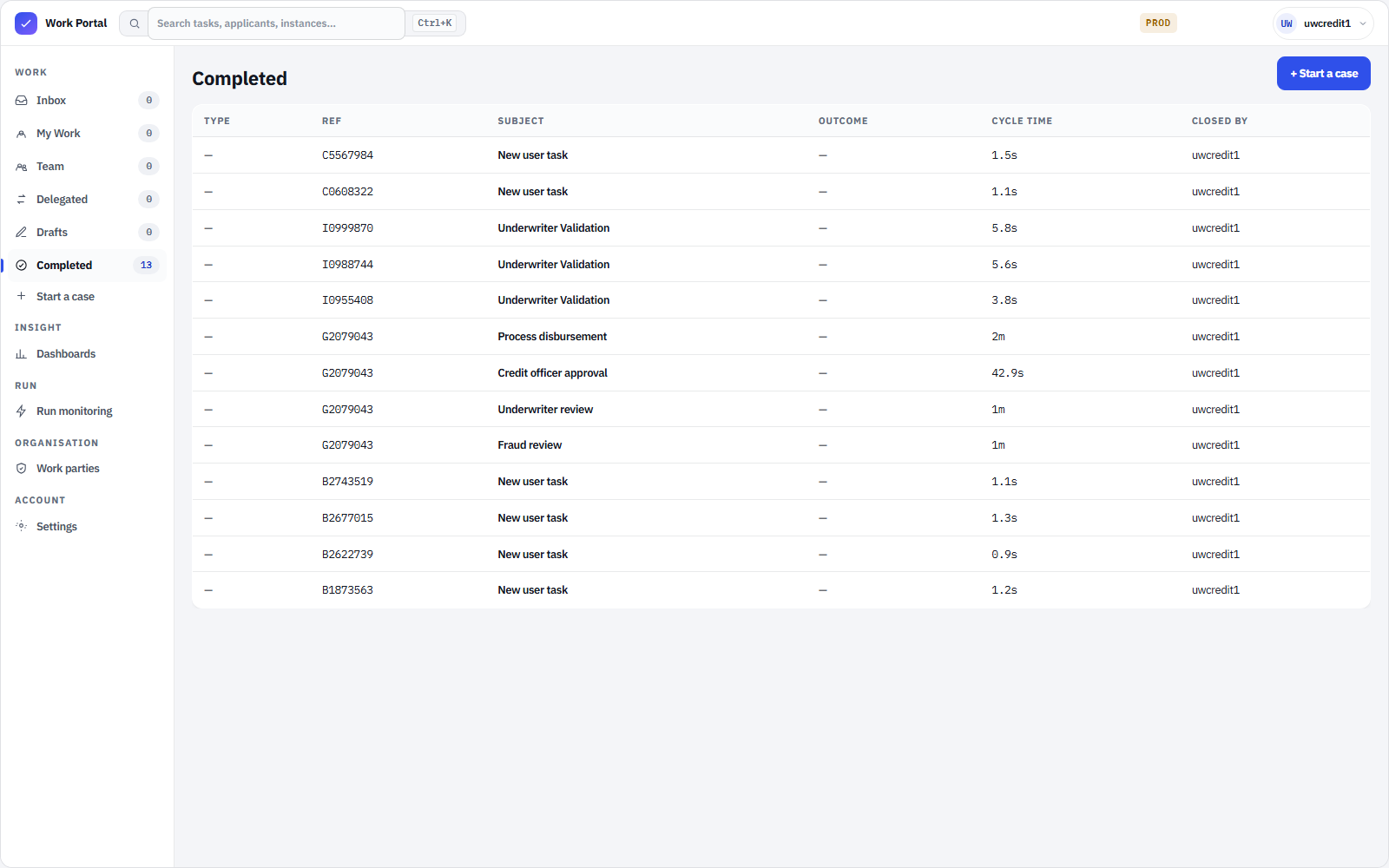
The three screens were captured on 2026-11-06 by the builder-journey test (47 of 47 steps passed), signed in as a test user of a throwaway app on Dev. The Completed list also shows other test cases that user closed on the shared engine. The inbox screen is not shown: its captures showed the four summary tiles (Yours, Breached, At risk, Unclaimed) cut to 38px with the filter bar drawn over them. That was a real defect, not a timing artefact (still 38px against 86px of content 1.5 s later), caused by the base stylesheet giving every button a fixed height that the tiles did not reset. It is fixed in the generator (compile-ds.js) and covered by test-compile-ds.js; an app shows the fix after its next regeneration. A regeneration of loan-onboarding into a scratch folder on 2026-11-08 carries it (.ow-wp-tile { … height: auto; … } in app/layout.css); no portal was built and rendered from it, so a new capture has not been taken.
7.8 Backup and rebuild#
cd kernel-poc && npm run restorerebuilds all 6.0 state (the Kernel, seeds, apps) from seed scripts. Artifacts that exist only in a database are a cache, not a corpus.- Over a populated store, a restore step can fail on purpose where a seed and the stored artifact both
changed (
EDITED_SINCE_IMPORT); resolve withnode src/seed-adopt.js <id>(--dryfirst). - A fresh worktree lacks local secrets (
platform-dev/openbao/*.json,rabbitmq/rabbitmq.env); copy them from the main checkout before restore. docker compose -f platform-dev/docker-compose.yml down -vcannot reach 6.0 state.- Proof tooling:
npm run restore:time,npm run test:restore.
7.9 Troubleshooting by symptom#
Start from what you see; the diagram covers the two most common deploy problems and the table lists the rest.
| Symptom | Likely cause / action |
|---|---|
| Designer shows old behavior after a fix | pnpm serve serves a prebuilt dist/; rebuild the package (and every SDK consumer) |
Designer never mounts; reading 'push' in react-dom |
Loaded via rsbuild dev; use build + serve |
| Hub apply says "not ready", env just changed | An SFTP inbox directory does not exist; create it first |
| SFTP file trigger silent | Stale pinned host key; re-run provision-sftp.js |
| Credit check answers 401 after a key change | App's .env.local older than the vault; generate:app-env, restart; use key:rotate |
| Browser tests fail after a UI change | UI contract ids changed; bump CONTRACT_VERSION, tell the TTB session |
| Login silently dead after an issuer change | OIDC discovery cached; restart the app |
A regen broke a running next dev |
Regenerate refuses under a live dev server unless --while-running |
| Queue consumer re-runs a failed message | maximumRetryAttempts misset; only 0 is one attempt |
| Deploy run stays queued | No deployer alive; the Center says so; start one or restart the facade |
| Build step: "the app's env cannot be derived… reads it and nothing derives it" | The generated app reads a variable the environment does not supply. Seen for DECISION_RUNTIME_URL and DECISION_RUNTIME_KEY on an app with a Decision step (fixed in dff7d6f; restart an older Kernel and deployer); otherwise fill in Runtime setup or the override file |
| Restore step refuses | Both seed and stored artifact changed; use seed-adopt.js |
Full gotcha list: CLAUDE.md.