Part 4 — Designing Applications
This part walks through every designer in the Workbench: what you edit, how it saves, what is generated and what the Kernel refuses.
Audience: builders. Each chapter has the same shape: purpose → what you edit → how it saves → generated result → common refusals → use cases. Use cases are in use-cases.md. Screenshots and the paragraphs marked "(observed)" come from a hands-on run in an isolated Workbench on 2026-11-05; everything else in this part is from the product's design documents and has not been checked by clicking.
4.0 Working in the Workbench#
| Topic | Rule |
|---|---|
| Shell | workbench/apps/shell (:3000). Designers load as federated remotes (ports below). |
| Open artifact | The "Open artifact" list shows the open app's artifacts plus "Shared"; "Show all apps" reveals the rest. |
| Save | Typed text or two or more related fields → one Save bar (one undo step). A single standalone choice applies instantly. |
| Refusals | When the Kernel refuses, the Save bar prints the reason. A dimmed button says why beside it, not only in a tooltip. |
| Undo / Redo | The shell's buttons undo the last composition and every designer reloads. |
| Permissions | A write is dimmed unless the signed-in builder holds the verb (view, edit, promote, manageConnections, manageMembers…) in the right scope. builder is view + edit only. |
| New artifacts | "+ New" on the project page, and each designer's overview, offer every kind a builder authors. |
| Selection | Clicking draws a selection overlay; Esc / arrows / Delete work; the breadcrumb shows the path. |
| Designer | Package | Port |
|---|---|---|
| Process | designer-process |
3001 |
| Data model | designer-data-model |
3002 |
| Page | designer-page |
3003 |
| App shell | designer-shell |
3004 |
| Design system | designer-design-system |
3005 |
| Decision | designer-decision |
3006 |
| Forms | designer-forms |
3007 |
| Content | designer-content |
3008 |
| Dashboard | designer-dashboard |
3009 |
| Integration | designer-integration |
3010 |
| Security | designer-security |
3011 |
| Glossary | designer-glossary |
3019 |
| Consoles | work portal 3012 · operations 3013 · workspace 3016 · data studio 3017 · app designer 3020 | — |
Ports come from .claude/launch.json; confirm there before relying on them.
An arrow is a reference one artifact holds to another, not a build order. A Process is deployed to the BPM engine rather than generated into the app. A Decision reaches the generated app through the Flows that evaluate it, which is why it has no arrow of its own to Generate. The Page and Design system designers also feed the generated app and are left out of the diagram.
Reaching a designer (observed in the Workbench, 2026-11-05). Press Ctrl+K (quick jump), type part of an artifact's name and click the result, or use the Open artifact list in the top bar; the right designer opens for that artifact. The left rail, top to bottom, is: Process, Integration, Application (the Page designer), Forms, App Designer, Decision, Case (not installed), Content, Dashboard, Data, Security. There is no Data model icon: the Data model designer opens when you open an Entity, and Data alone opens Data Studio (which shows "No workspace" until the app is in a workspace with an environment). A designer opened from the rail shows nothing useful until an artifact of its kind exists.
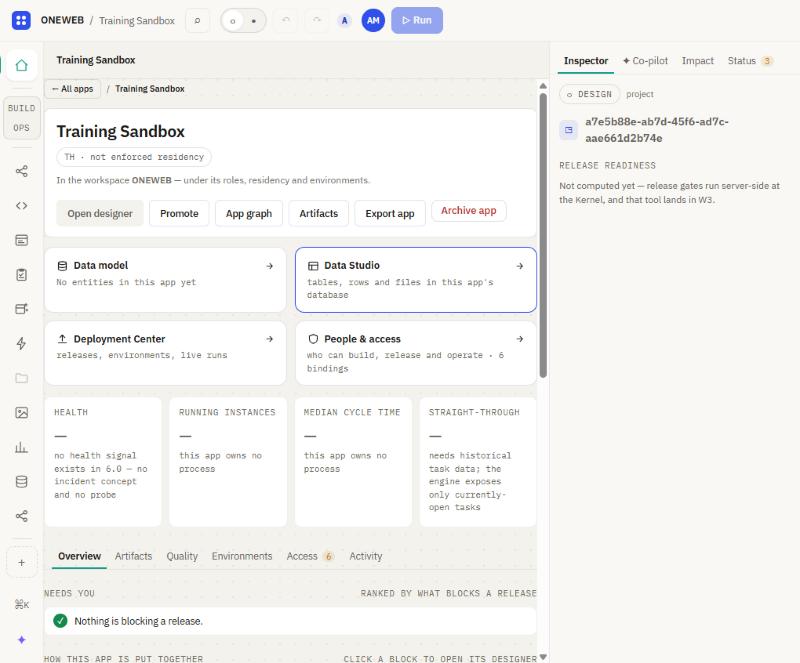
Creating artifacts (observed in the real Workbench, 2026-11-05). On Home, + New app asks for a name and creates the app in the open workspace. Open the app: its project page has buttons (Open designer, Promote, App graph, Artifacts, Export app, Archive app), tiles (Data model, Data Studio, Deployment Center, People & access) and tabs (Overview, Artifacts, Quality, Environments, Access, Activity). In the Artifacts tab, + New opens a New artifact form with a Kind: Data model, Glossary, Form, Page, Dashboard, Design system, Process, Decision, Flow, Connection, API policy, Contract, Content, Security roles. Each kind asks only for what it needs: a Data model needs a name, a table name, a first column and its type; a Form needs a name and a data model; a Decision, Process or Flow needs a name (a Flow also a trigger); a Connection a name and a kind. The new artifact opens in its designer. The Integration designer also offers the same choice (Flow, Connection, API policy) in its inspector.
4.1 Data model (Entities)#
Purpose. Define tables: fields, keys, relations, indexes, row policies, residency tags.
You edit. Entity → fields (type, length/precision/scale, required, unique, typed default,
description) → primary key → relations and indexes → row policy → sensitive marks → residency tags
→ optional version field for optimistic locking.
Editing a field in place. Edit a field rather than deleting and re-adding it (entity_set_field).
The result is classed safe / unsafe / blocked for the app's database dialect, with reasons; a dry run
writes nothing. A rename records renamedFrom so the migration is a real rename. Structured
dependants (indexes, relation joins, Form widgets, grid columns) move with it; places that keep the
old name as text (row filters, formulas, Content, other apps) are named and must be acknowledged.
An unsafe change is not refused: it is saved and the result lists why it is unsafe (reasons). Other refusals (key columns, a default or comment the column cannot hold, a stale edit) are listed under "Refusals to expect" below.
Generated. CREATE TABLE for seven dialects (Postgres, MySQL, MariaDB, SQL Server, Oracle, DB2,
Tibero), column comments, migrations between versions, read/write endpoints with row policies, and a
schema-version table.
Refusals to expect. Blocked type changes (e.g. text → number on Postgres); a type change on a primary-key or foreign-key column; a residency tag that would strand the app; a stale edit.
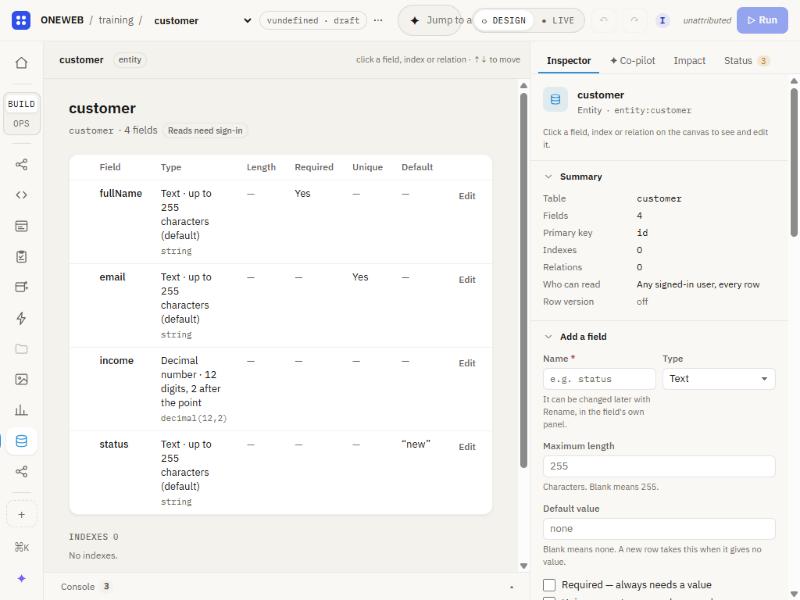
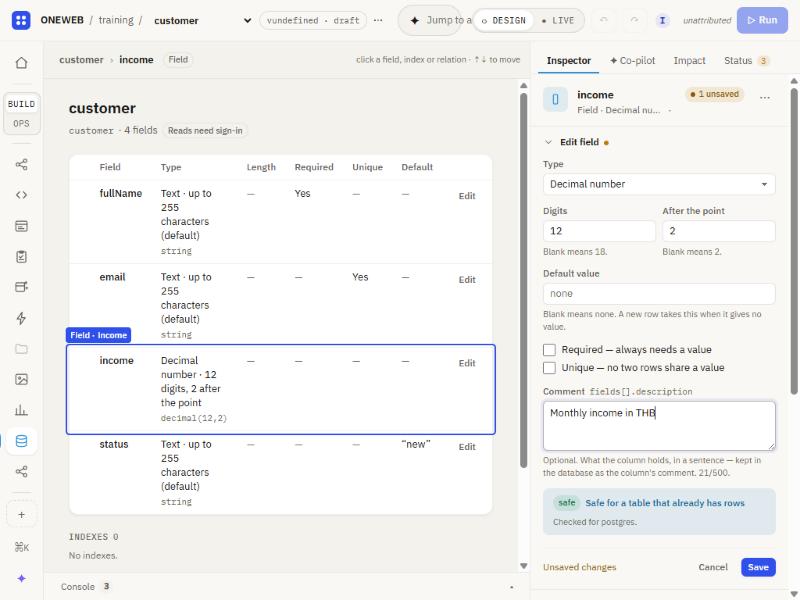
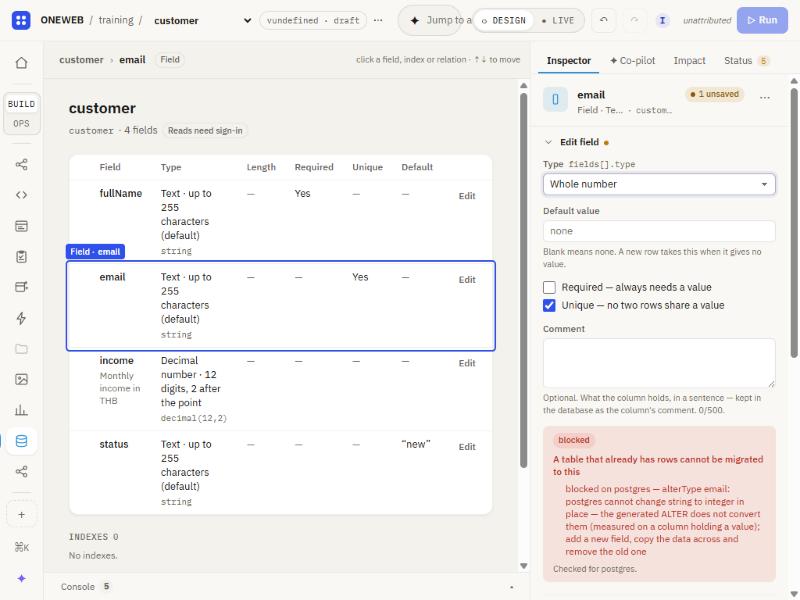
What you see (observed). Select a field and press Edit: the panel offers Type, length or digits, Default value, Required, Unique and Comment (the field's description). Before you save, a verdict box reads, for example, "safe — Safe for a table that already has rows. Checked for postgres." Changing a text field to a whole number on Postgres shows a red "blocked — postgres cannot change string to integer in place … add a new field, copy the data across and remove the old one". Cancel discards it. A saved comment shows under the field name, and the shell's Undo removes it.
Related. Data Studio inspects the live database (browse, query, add column in Dev, "Set up a database" for a new app). Use cases: UC-1, UC-8.
4.2 Forms#
Purpose. Screens for data entry and process tasks.
You edit. Blocks and tabs; widgets bound to Entity fields; buttons and events; access rules;
validation; translations; branding; number and date formats (config.number / .date, form number
locale) — never hard-coded locales in generated code.
Moving a field. Drop it on any part of another field (near half = before, far half = after), or
use the ⋯ menu (up, down, top, bottom, to block), Alt+↑/↓, or the Outline. All are one operation,
form_move_widget.
Generated. Form components in the Next.js app and the Work Portal. The Work Portal's UI hooks come
only from ui-contract.js, so browser tests have stable ids.
Adding a field (observed). Click the block, then in the right panel under Fields choose an Entity field (the list offers only fields not yet on the form), keep or change the Field type, and press + Add field. Fields still unused appear as chips under the block. The panel also has Layout (columns), Buttons and Who can see this block.
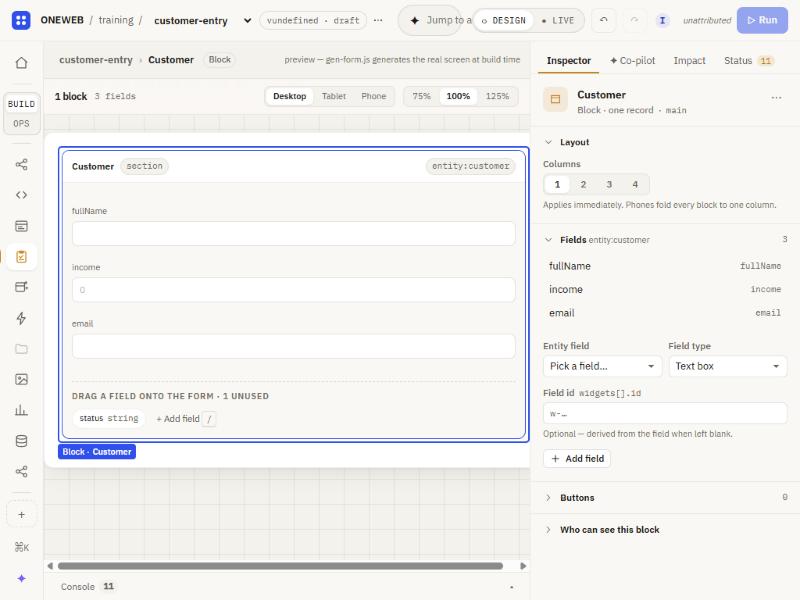
Refusals. A widget bound to a field that no longer exists; a rename of a field referenced as text. Use cases: UC-1, UC-8.
4.3 Pages and the design system#
Purpose. Free-form pages composed from components; the look of everything.
You edit. Components, bindings to state and data, actions (including rest actions that may carry
an entityRef so impact analysis sees them), breakpoints, styles. Text uses { $t } keys resolved in
one content locale. The Design system designer sets palette, type and scale steps and component
variants. tokens.css is re-extracted, never hand-tuned; white-label branding is an override layer.
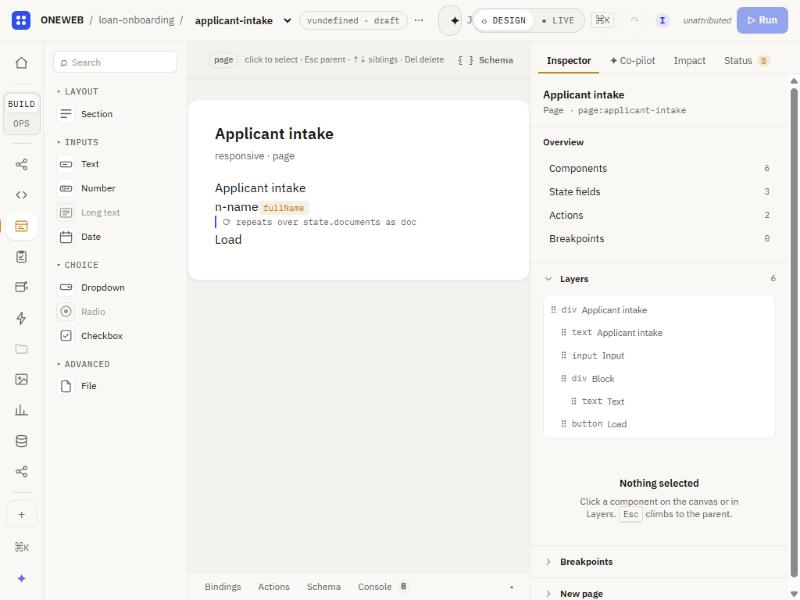
Import. page_import_html reads existing HTML back into the Page IR through the design system's
contracts, so a vendor's class names live in the design system, not in the importer.
Generated. Next.js pages and compiled CSS (compile-ds.js), with a lint that refuses invented
vendor classes. Parity between the canvas and the generator is tested.
4.4 Processes (BPM)#
Purpose. The case flow: who does what, in which order, within which SLA.
You edit. Start/end events, user tasks (with a Form), service tasks (calling a Flow), script and notification tasks, gateways, sub-processes, boundary events (timers), lanes, work parties (roles that hold tasks), stages, case display and summary, priority and SLA.
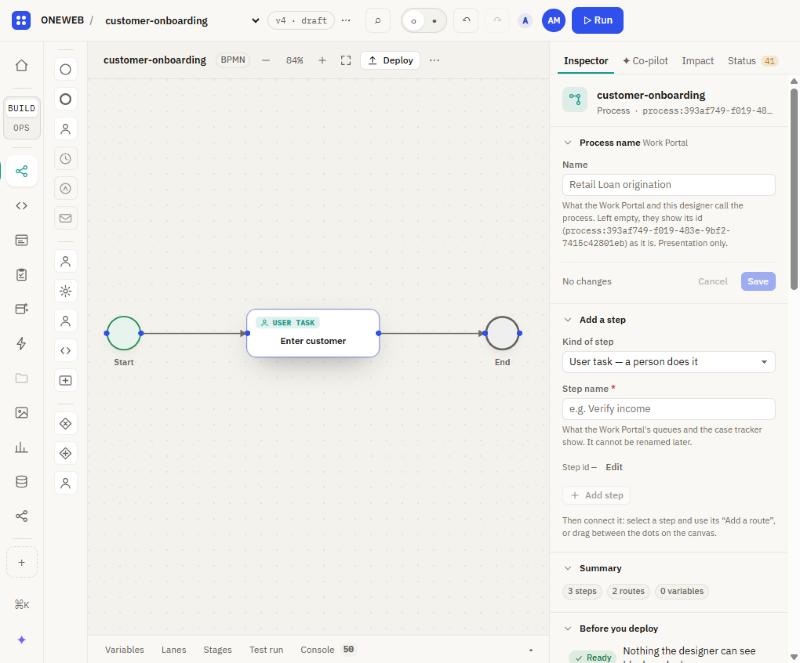
Starting a Process (observed). A new Process has a Start and an End and the note "Add the first step". In the inspector, Add a step takes a Kind of step (User task, Service task, Exclusive gateway, Parallel gateway, End) and a Step name (it cannot be renamed later). Routes are made by dragging from a step's dot to another's, or with "Add a route" on a selected step. With Start, one user task and End connected, "Before you deploy" reads "Ready".
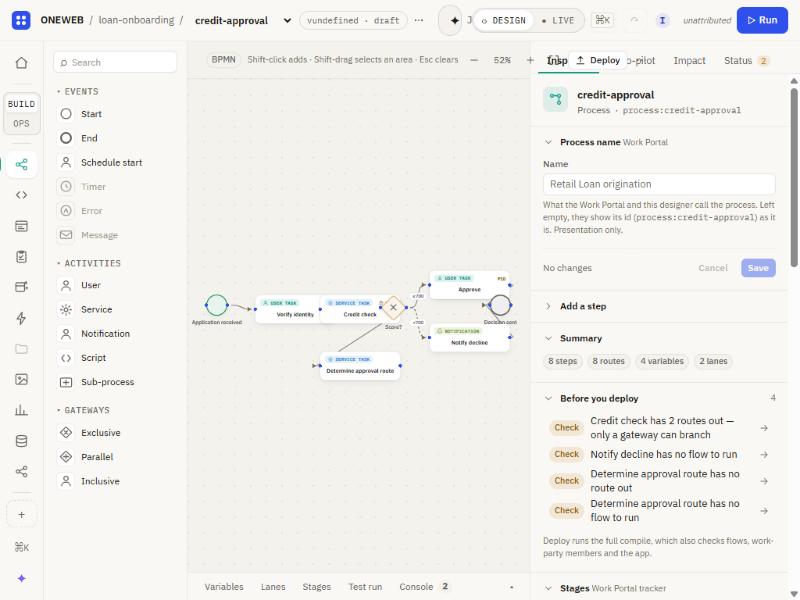
The inspector lists Before you deploy checks (for example a task with two routes out where only a gateway can branch); deploy runs the full compile, which also checks flows, work-party members and the app.
Calling a Flow. The Call panel maps process variables to flow inputs/outputs and shows what the
deploy would refuse, using the same rule as the deploy compiler (flow-call.js). Limits: the engine can
present only an API key (so oauth2/mTLS flows get an engine-facing door), and an output must be set by
a step and land in a string variable.
Case field. The entry Form must have the correlation field (bpmInstanceId); the designer offers
to add it.
Deploying. Deployed to the BPM engine at release; the engine fixes task candidates at deploy, so first members of each work party are picked in the app's Access tab. Use cases: UC-1, UC-2, UC-3.
4.5 Decisions#
Purpose. Business rules a non-developer can read and change.
You edit. Inputs, outputs, a decision table (hit policy, rules, dates, enabled flags), a decision
tree (convertible to a table), or a single expression; tests; requirements; monitoring thresholds.
Cells are written in FEEL (compile-feel.js), with rule templates giving a form for common
conditions that write the same FEEL.
Hit policies (evaluateDecisionTable in compile-feel.js; labels from the designer):
| Setting | Key | Behaviour |
|---|---|---|
| First match wins | first |
The first matching rule in row order answers; no match gives an empty result. |
| Only one rule may match | unique |
Two or more matches is an error. |
| All matches must agree | any |
Several matches are allowed only if their outputs are identical, otherwise an error. |
| Highest priority wins | priority |
Several matches are ranked by each output's declared allowedValues order (first value highest); with two or more matches, an output without that order is an error. |
| Collect every match | collect |
Returns the outputs of every matching rule as a list. |
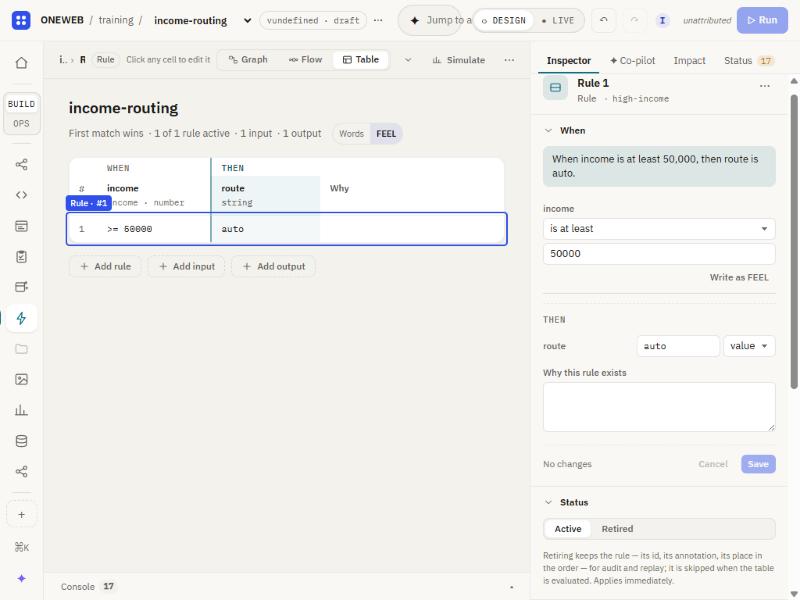
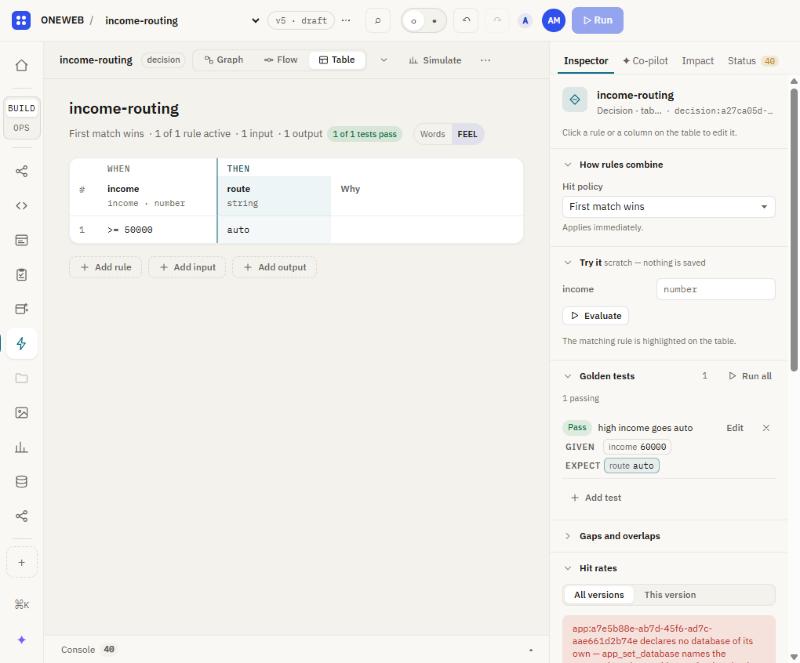
Adding a rule (observed). The designer opens on the Table view (also Graph and Flow) with a Hit policy (default First match wins). Press + Add rule, give a Rule id, set WHEN (for an input choose is, is not, is more than, is at least, is less than, is at most, is between, is one of, is anything) and the THEN output value, then press Add rule and Save. If the THEN value is left empty the rule is saved with an empty output ("—") and returns nothing. + Add test under Golden tests guards later edits.
A new Decision has no inputs and no outputs; add them with + Add input (name, label, type: string, number, boolean, date, enum) and + Add output before any rule. A Golden test takes a name, values for the inputs and the expected outputs; Run all reports "1 passing" and a green "1 of 1 tests pass" chip. A Hit rates note ("declares no database of its own") appears for an app with no database of its own.
Governance. Bind inputs/outputs to Glossary terms; run tests; see hit rates and drift; run a champion/challenger experiment; read rule history; approve a version (four-eyes: the approver wrote none of the changes since the last approval).
Generated / deployed. Evaluated by a vendored evaluator in the generated app (and exposed to the Hub through a sidecar), so there is one FEEL implementation. DMN import/export is available. Use case: UC-4.
4.6 Glossary#
Purpose. One vocabulary: a term has a label, definition, type, unit and a label per allowed value.
You edit. Terms, values (add, remove, rename), synonyms, usage; import a data dictionary from CSV (dry run first, then commit — the whole file is refused on any row's problem).
Rules. Binding a Decision input to a term never changes what a rule compares. Contradictions (type, undefined value) are refused at bind time and when either side changes later. A glossary serves its own app and workspace only. Use case: UC-4.
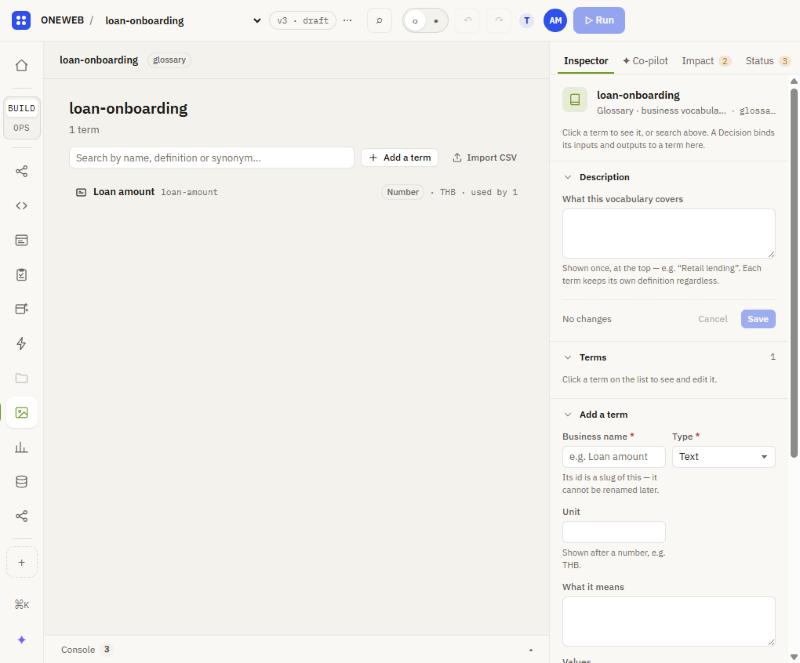
To open it: the app's project page, Artifacts tab, set Kind to Glossary, then click the row. The list shows each term with its type, unit and how many Decision inputs or outputs use it ("used by 1").
4.7 Integration (Flows, Connections, Policies)#
Purpose. Calls to and from other systems.
You edit.
- Connection — kind (database, REST, SOAP, SFTP, object store, AMQP, Kafka, SMTP), non-secret config, default headers. Secret values are pasted write-only into the vault, never saved in the artifact.
- Flow — variables (flag
sensitivefor anything that must not be recorded), a trigger, ordered steps, edges. A "Choose a path" step draws as side-by-side lanes with conditions in words, built in the condition builder; steps are moved by drag. - Policy — how callers authenticate to an exposed flow.
Creating one (observed). In the Integration designer's inspector, the bottom section New flow, connection or API policy takes a Kind (Flow, Connection or API policy) and a Name. A Connection also asks Connects to (REST API, SOAP service, Database, Mail server, Object store, SFTP server, Message broker, Event broker, Custom connector). Its settings take a Base URL variable: the name of an environment variable such as RATES_BASE_URL, not a URL, since the value differs per environment. Authentication offers None, Basic, API key header, Bearer token, OAuth2 client credentials and Request signature. Secrets per environment needs the app to be in a workspace (it has no vault path before). A Flow asks Starts when; Variables → Add variable takes a name, a type, and flags The caller supplies it (input), Handed back to the caller (output), A list of values and Sensitive; the empty flow offers Call a REST API as a first step (Connection, Method, Path relative to the base URL with {variable} placeholders, Request data, Headers).
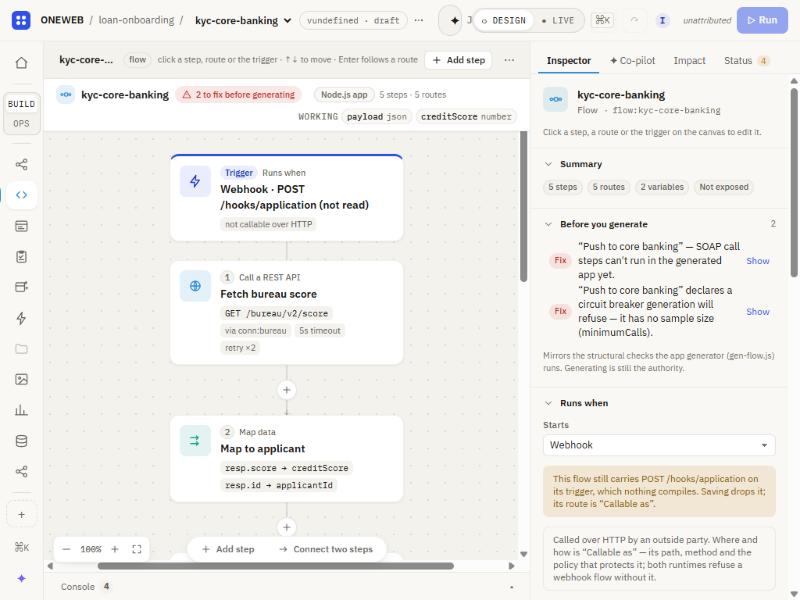
Step types include REST (own headers), database, file, SOAP, decision, render, notify, publish, sub-flow, script and map. Triggers: webhook, schedule, queue, event, file, file basket.
Runtime. Each Flow chooses in-app or Hub; the designer states what each runtime does not support. Details in Part 5. Use cases: UC-1, UC-5, UC-6, UC-7.
4.8 App shell, Content, Dashboard, Security#
- App shell — navigation items, layout and the admin role setup (
gen-shell.js). - Content — templates with variables (letters, e-mails), rendered by
notifyandrendersteps. - Dashboard — widgets and series over a source.
- Security — roles and capabilities for the app.
4.9 Export, import and Data Studio#
- Export / import (
ARTIFACT-TRANSFER.md): an artifact or a whole app as a versioned file, copied into another app as new artifacts. References are rewritten only where the schema declares one; a secret value is refused on export and import; a database Connection gets its own schema and logins. - Data Studio (:3017) — browse tables, run queries through least-privilege logins, view the ER diagram, add a column in Dev.
Exporting a whole app and importing it creates a new app (app_import takes a workspace and a new app id) rather than adding artifacts to an existing one.
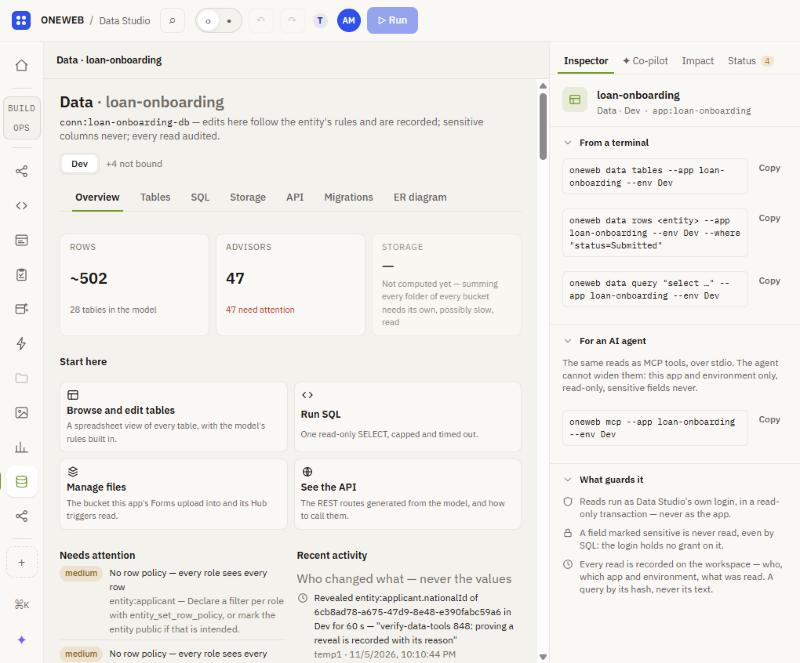
Once the app sits in a workspace with an Environment, the Data rail icon opens this view for the
open app and its environment (here Dev; other environments that have no binding are listed as
"not bound"). The Overview's Needs attention list is the advisors, such as an entity with no row
policy. Reads run as Data Studio's own read-only login, browsing and queries never return the value of a field marked sensitive (one value can be shown separately, with the revealSensitive verb and a stated reason), and every
read is recorded on the workspace by who, which app and environment, and what was read, never the values.
4.10 Veda (AI assistant)#
Veda proposes compositions across several designers. They run through the same typed tools,
validated and authorized like a human's, and are shown for approval, undo and provenance (ai: true,
prompt, model, approver). The model is configurable. Golden tasks in eval.js / eval-tasks.js guard
behavior (npm run eval:build adds a real generate-and-build task).
4.11 The App Designer (AppX)#
An external editor hosted in an iframe (console-app-designer, :3020) with its own host (:3021). Its
user is the ONEWEB app, not the person, and data must go through Entities. Several parts (Kernel
link, gateway, deploy unit) are not built yet; treat this chapter as provisional.
4.12 Where to see these in action#
| Designer | Worked in |
|---|---|
| Data model, Forms, Process, Decision, Glossary | UC-1, UC-4 |
| Process → Flow call | UC-2, UC-3 |
| Integration | UC-5, UC-6, UC-7 |
| Row policies, optimistic locking | UC-8 |