Part 6 — Identity, Security and Compliance
6.1 Identity model#
- One Keycloak realm per organisation, with Active Directory behind it where the org has one.
An app names its realm in
identity.realm, defaulting to its environment's. - Keycloak runs at :8095. Realm import happens only when the realm is absent; changing the JSON and
restarting does nothing (use
down -v). - The IAM2 facade relays discovery, token and JWKS to Keycloak byte-for-byte (without re-signing) for apps that route through it (support-desk); its 5.0 container is then a required dependency.
6.2 Authn / authz in generated apps#
The sequence below shows a sign-in to a generated app.
OIDC with PKCE; the callback verifies signature, issuer, audience and nonce. POST /api/auth/refresh
rotates a session using a separate ow_refresh cookie, with replay detection enforced by the realm.
The client refreshes shortly before expiry while the tab is active and shares one refresh across tabs.
Back-channel logout ends a session the issuer ended elsewhere. Discovery and the key set are cached
for the process lifetime: an issuer change needs a restart. OW_JWT_ISSUER is the only issuer setting.
Keycloak's discovery document advertises its configured hostname as the issuer and in every URL, so a
container that discovers from inside the network is handed a JWKS URL it cannot reach. The issuer
(OW_JWT_ISSUER) and an optional key-set override (OW_JWKS_URL) are therefore pinned separately.
6.3 Kernel authorization#
Every tool call, reads included, needs an established identity; read-only tools are exempt by name from the edit-verb requirement (they need view); the gate fails closed
(KERNEL_REQUIRE_AUTH defaults on). Authorization resolves against the target's own workspace;
a call spanning two workspaces is refused. The facade binds 127.0.0.1 only.
Four-eyes approval of Decisions. An approval covers one sequence number, and its approver wrote none of the
changes since the last approval (a promoted challenger's authors included). It is recorded on the artifact's
workspace, never on the artifact. In an environment whose fourEyes setting names Decision, deploy_plan blocks
an app shipping an unapproved Decision (not-approved).
A separate setting, Environment.deployFourEyes, decides whether a deploy needs someone other than the
release's authors. A decision_approve never clears it. Absent means off for an environment named Dev or
Development and on elsewhere.
Workspace roles and verbs. Roles carry verbs: view, edit, promote, approveProd,
manageConnections, manageMembers, and others. Starter workspaces get six default roles. The
Workbench dims a control unless the signed-in builder holds the verb in the right scope (a grant on one
app does not answer a workspace-wide question). Separation-of-duties rules and findings are reported
(workspace_sod_findings). Access history, summary and what-if are available.
6.4 Identity at deploy#
Where you set it (observed, 2026-11-05). On an app's project page the Access tab shows Administrator roles (User administrator role, Helpdesk role, Auditor role; "Deploy creates each one in the app's realm") and First admin ("Nobody is named yet — until someone is, nobody can administer this app's people"), with a people search in the app's realm. The right panel says "Pick a person to see what they can do".
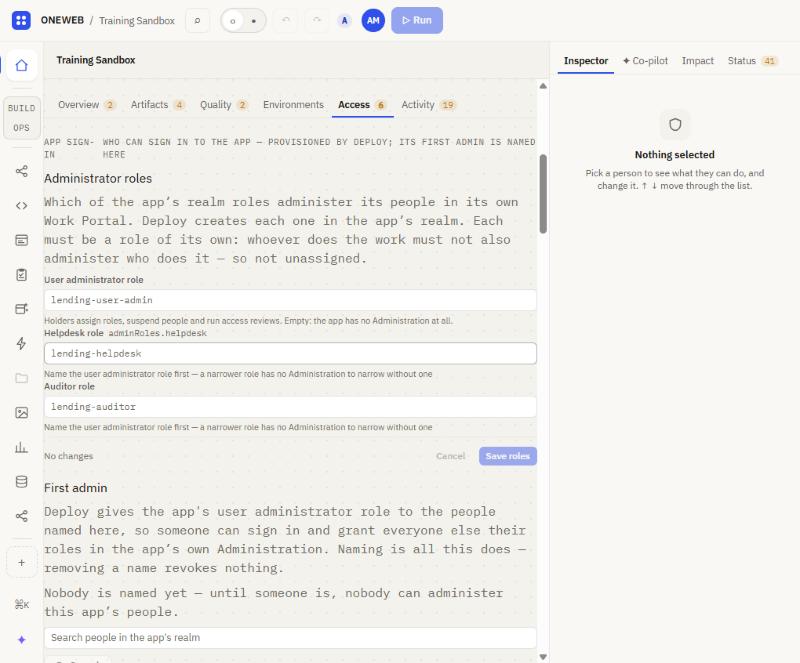
The identity step runs before the process deploy, because the engine fixes a task's candidates at deploy, so the first members must already be granted.
The Deployment Center's identity step (identity-apply.js) provisions, in the app's realm:
- a confidential PKCE login client with redirect URIs for the environment's address,
- one realm role per work party that the Process IR assigns,
- the
<app>-adminclient for the admin portal, - the first-admin and first-member grants chosen in the Access tab.
Client secrets go to the vault (VAULT_APP_OIDC_<APP>, VAULT_APP_ADMIN_<APP>). Objects ONEWEB
creates carry an owner mark; a hand-made object that differs is refused by name and nothing is
applied. A hand-made client can be adopted explicitly. Realms are never created. It signs in with a
scoped oneweb-identity client per realm (manage-clients, manage-realm, manage-users),
provisioned once by an admin: npm run provision:identity-client -- --realm <r>. Every apply is an
identity_applied event.
Objects that ONEWEB did not create are treated conservatively.
The scoped client is created once per realm by an admin.
6.5 Row policies, sensitivity and residency#
- Row policies. Written on the Entity; evaluated with bind parameters. One that cannot be enforced answers 503. Creates, updates and deletes are governed too.
- Sensitive fields are marked on the Entity and masked in run history and logs.
- Residency (
residency.js) is enforced at deploy: the allowed regions are those both the workspace policy and the entity'sresidencyTagsagree on. An environment declaring no region is refused once a constraint applies. Stranding an app (no shared region) is refused at either edit.kernel_findingsreports which environments a tag set rules out.
6.6 Admin portal and step-up MFA#
Apps with an admin portal ask for a second factor only when asked to. The realm side defines a
two-level browser flow (browser-loa: password, then OTP) and binds it to one client; the app side
(app/lib/step-up.ts) judges the acr claim on writes and at sign-in. Two switches (mfaAdmin,
mfaPrivileged) default OFF; turning one on requires the setter to already be at level 2.
WebAuthn is not offered. Provision with provision-app-step-up.js (dry run first).
A write that fails the check is refused, not queued: the app answers 401 with the error code step-up-required and a login link that asks for level 2. The other switch, mfaPrivileged, is decided at the sign-in callback instead: a person who holds a role marked privileged and signed in below level 2 is sent back through the login route once, and if they return still below it the callback stops with step-up-unavailable rather than loop.
A switch left on after the flow is unbound is the situation the recovery below addresses.
6.7 Secrets#
Values live only in OpenBao; artifacts hold names. Part 5 §5.8 covers writing and rotation. Access
uses two AppRoles: the read-only hub-apply (also used on the deploy side) and kernel-secrets,
which can write kv/data/oneweb/* but is proven unable to read a value back. Nothing falls back to
root or to a file. Writes record secret_written events with names and versions
only.
6.8 DevSecOps pipeline gates (G0–G9)#
Chosen per environment by an org admin in the Deployment Center ("Pipeline gates"). Absent = none.
| Gate | Stage | Gate | Stage |
|---|---|---|---|
| G0 | Plan | G5 | Test |
| G1 | Commit | G6 | Dynamic (post-deploy) |
| G2 | Static | G7 | Release (evidence manifest) |
| G3 | Supply chain | G8 | Deploy |
| G4 | Infrastructure | G9 | Operate |
Rules: a block gate whose tool is not installed fails; warn records and continues; findings
at or above failOn (default high) count unless an unexpired entry in security/risk-acceptances.json
names them. Evidence is written under .deploy/<ws>/<env>/evidence/<run>/. crosswalk() maps checks
to ISO/IEC 27001 and NIST SSDF controls. Not proven: the scanners' command lines were written from
documentation and tested against samples only; G0/G9 need org-specific files that do not exist yet.
6.9 Security remediation and standing constraints#
Track items in SECURITY-REMEDIATION.md. Standing rules: the reference stack never leaves localhost;
dev CORS is dev-only; no CI run has been read, so CI is "unverified", never "green".