Training Manual — Day 1: Understand and build
Back to the course overview.
Module 1: What is ONEWEB?#
Key points#
- Enterprise apps (onboarding, lending, case handling) are slow and inconsistent to build because each piece (data, screens, process, rules, integrations, security, deployment) is built separately.
- ONEWEB 6.0 is a governed, AI-native application platform: you design the app as structured artifacts and ONEWEB generates the running app.
- Three ideas: one source of truth (the Kernel), generate-never-hand-edit, governed by default (history, undo, approvals, permissions; AI changes follow the same path).
- Generates: database tables and migrations, APIs with row policies, screens, a case-handling Work Portal, an admin portal, integration routes, and a deployed process.
- 5.0 vs 6.0: shared database schemas → one artifact graph; WAR/WildFly → containers; per-designer history → event-sourced history with undo and AI provenance.
Demo (trainer, 10 min)#
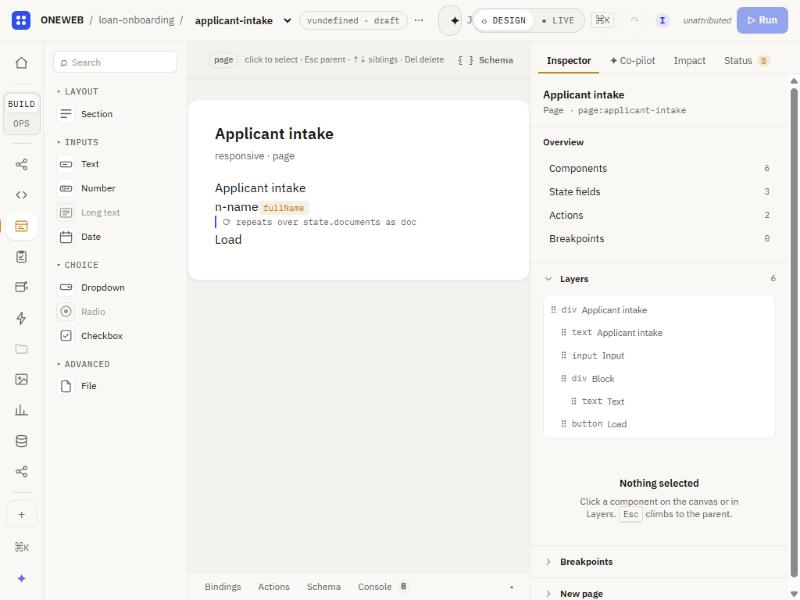
Open the loan-onboarding app (UC-1). Show, in order: its Entity, a Form, the Process, a Decision, a Flow, then the running Work Portal with one case. Do not start or submit a parked demo case.
Check questions#
- In one sentence, what is ONEWEB 6.0?
- Why is
generated/never edited by hand? - Name two things the platform generates besides screens.
Trainer notes#
Module 2: Core concepts#
Key points#
- Artifact: one typed, versioned specification (Entity, Form, Page, Process, Decision, Glossary, Flow, Connection, Policy, Content…). The IR is its JSON, defined by a schema.
- Two renderers, one spec: a designer draws it, a generator runs it.
- Kernel: an event store. Each change is an event; the current spec is the fold of its events.
- Composition: a group of changes undone as one step.
- Lifecycle: draft → publish → promote (live) → archive/restore.
- Containment: App ⊂ Workspace; a Workspace holds Environments (Dev, Test, Prod) and members.
- Typed tools: every change, from a person, a script or Veda, is a validated, authorized tool call.
- Principles: fail closed; refuse rather than guess.
Where things are#
Rail, top to bottom: Process, Integration, Application (this is the Page designer), Forms, App Designer, Decision, Case (not installed), Content, Dashboard, Data (Data Studio), Security. There is no Data model icon: the Data model designer opens when you open an Entity. A designer is empty until an artifact of its kind exists.
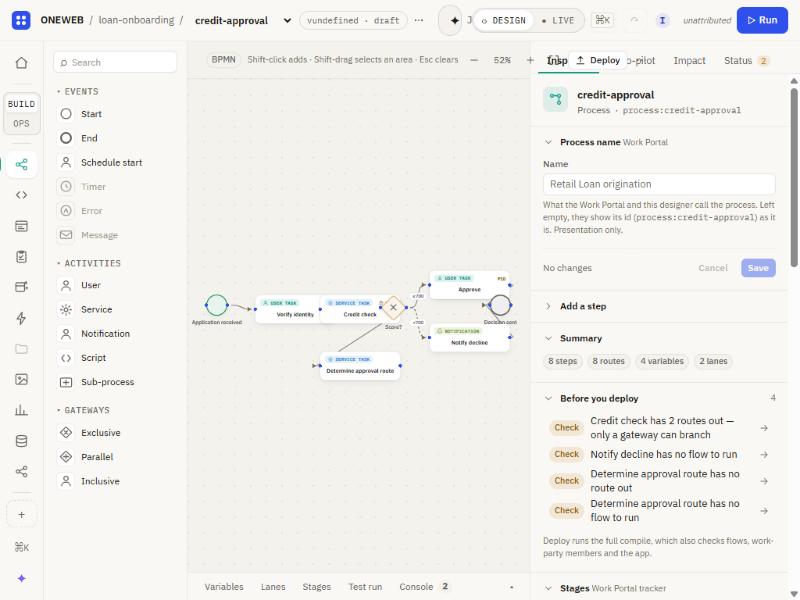
Lab 1 — Tour and undo#
Goal: find your way around and see that nothing is lost.
- Sign in to the Workbench with your learner account.
- Open your training workspace and its app (use Open artifact; "Show all apps" reveals the rest).
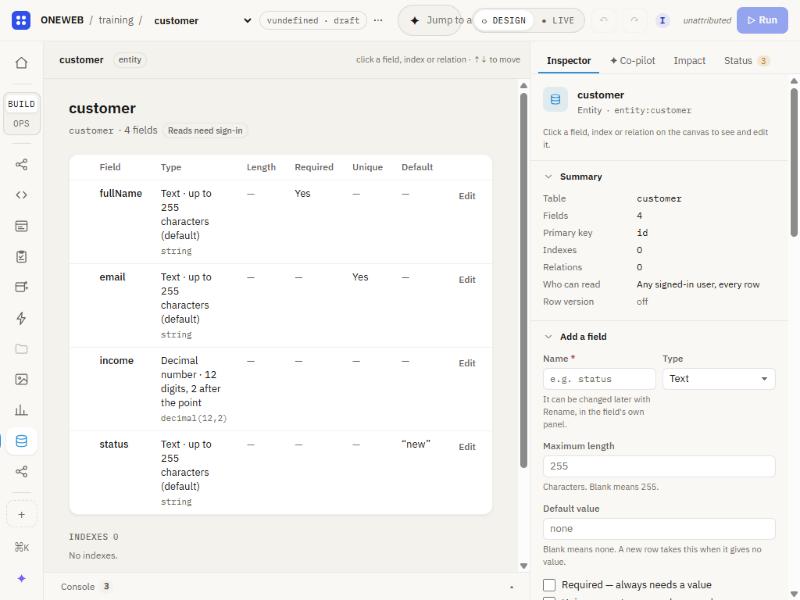
- Open any Entity (the Data model designer opens for it). Look at its fields.
- Click a field's Edit, type a sentence in Comment (this is the field's description), and press Save. The comment appears under the field name.
- Click the shell's Undo (top bar, left of Redo). The comment disappears.
- Click Redo. The comment returns.
- Find an artifact's history and identify the event you just made. (Not yet verified: where history is shown. Check the Status tab and the audit trail in the right panel.)
Check questions#
- What is a composition, and why does it matter for Undo?
- Which is stored: the current spec or its events?
- What is the relationship between a Workspace and an Environment?
Trainer notes#
Module 3: Architecture#
Key points#
Draw this on a whiteboard and have learners copy it:
Browser → Workbench shell → Kernel facade → Kernel event store → Postgres :5437
                                 │
                                 ├─ generators → generated app
                                 ├─ Hub generator → Camel worker
└─ Deployment Center → deployer → target| Service | Job |
|---|---|
| Postgres :5437 | Kernel event store and generated apps' data (:5432 is the 5.0 reference stack, which also holds the BPM engine's schema) |
| Keycloak :8095 | Identity; a realm per organisation |
| OpenBao | Vault: secret values live only here |
| Jaeger | Flow run history |
| RabbitMQ / Kafka | Hub queues and events |
| BPM engine | Runs deployed processes |
| Mailpit | Dev mail |
- Workbench = Module Federation shell; designers are remotes.
- Two runtimes for Flows (in-app and Hub) from one artifact; parity is proved by execution.
- Principles: fail closed, refuse rather than guess, every SQL value a bind parameter.
Lab 2 — Find the pieces#
- List the services from the course environment sheet and open each one's health or UI page (Keycloak, Jaeger, Mailpit).
- In the Workbench, open the Environments tab of your workspace and read the Runtime setup block. Note which services it names.
- In your app's Data model, identify the database the app will use.
- Draw, on paper, the path of one request: a person clicks Save in a designer → ? → the database.
Check questions#
- Why are there two Postgres servers?
- Where do secret values live?
- Why do the in-app and Hub runtimes both exist?
Trainer notes#
Module 4: Data and screens#
Key points#
- Data model designer: Entities with typed fields, keys, relations, indexes, row policies, optional
versionfield for optimistic locking. - Editing a field in place reports safe / unsafe / blocked for the app's database with reasons; a dry run writes nothing; a rename is a real rename on every dialect.
- Forms: blocks, widgets bound to fields, buttons, validation; numbers and dates formatted from the Form's own settings, not hard-coded locales.
- Glossary: one vocabulary of terms, units and allowed values that a Decision's inputs and outputs bind to.
- Design system and shell: the look and navigation; generated, never hand-tuned.
A Form points at an Entity and each widget names one of its fields. A Glossary term is bound by a Decision's
input or output (decision_bind_term); no binding from a Form or an Entity field to a Glossary term was found in
the schemas, so Lab 3 step 8 (not verified) may not offer one.
Lab 3 — Customer record#
Where "+ New" is. Open your app's project page (Home, then click the app). Open the Artifacts tab and press + New. The New artifact form asks for a Kind (Data model, Glossary, Form, Page, Dashboard, Design system, Process, Decision, Flow, Connection, API policy, Contract, Content, Security roles) and the fields that kind needs. (Run 2026-11-05 against the real Workbench.)
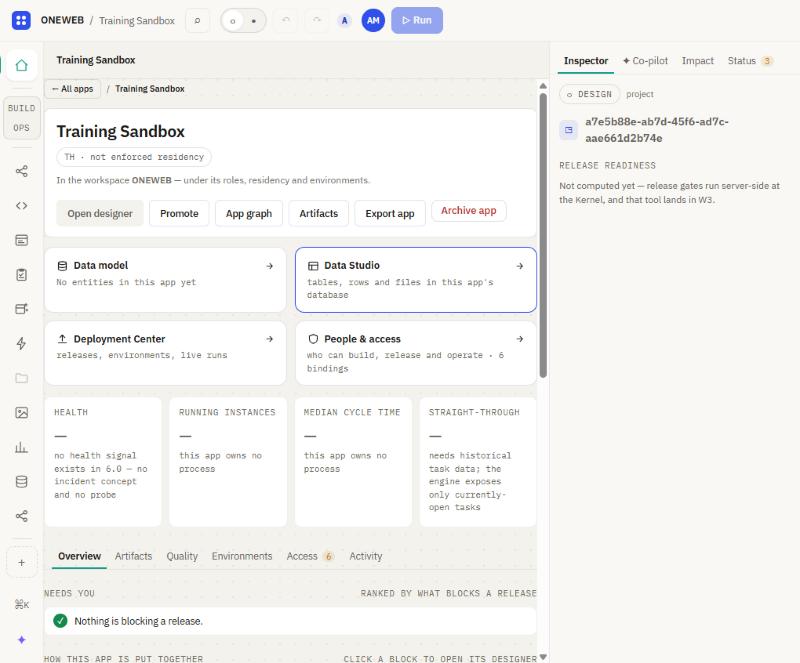
- + New, Kind Data model: Name
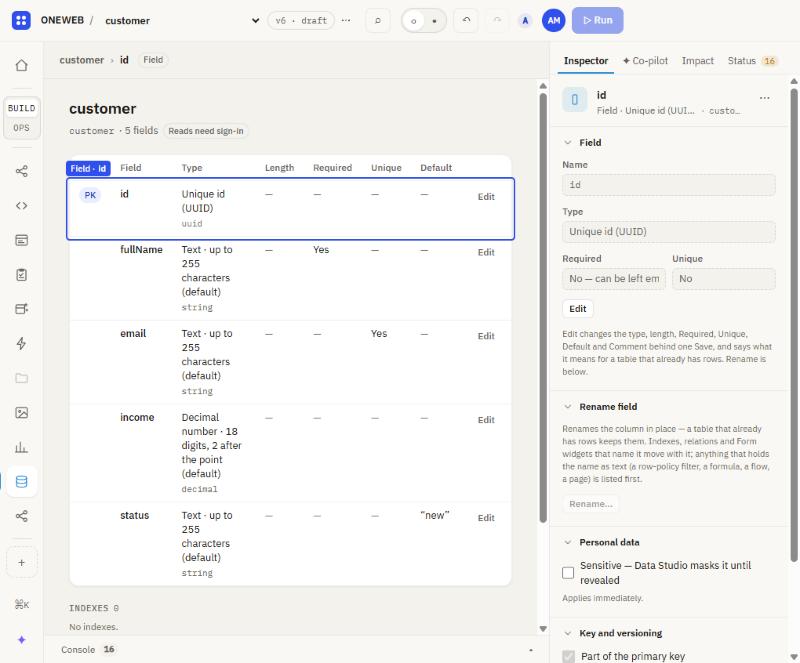
customer, Table name (filled from the name), First columnid, Its type Unique id (UUID), then Create data model. The Data model designer opens with the one column. - In the right panel under Add a field, add
fullName(Text, tick Required),email(Text, tick Unique),income(Decimal number) andstatus(Text, Default valuenew), pressing Add field each time. The panel closes after each add; press the + Add field button under the table to open it again. - Select
idand tick Part of the primary key (the panel warns "No primary key" until you do). A PK badge appears on the row.
- + New, Kind Form: Name
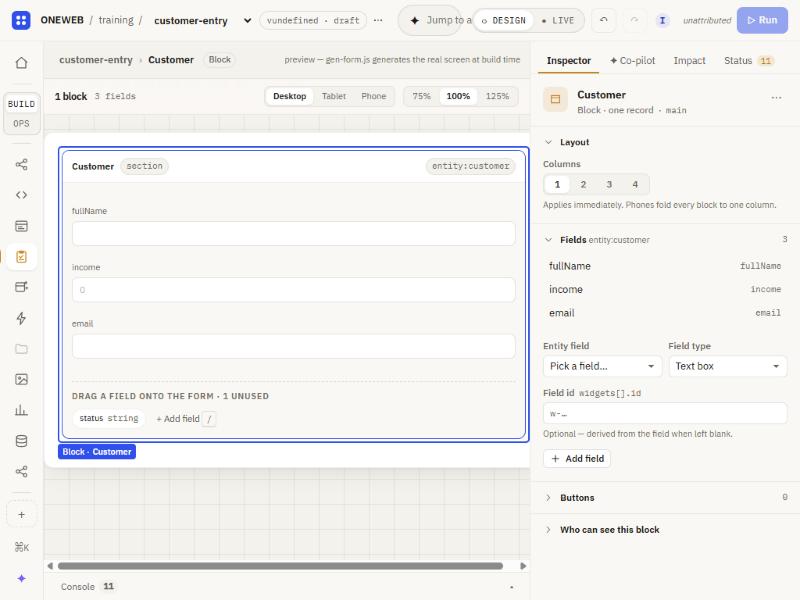
customer-entry, Data modelcustomer(pick it from the list), Create form. It opens with one block,b-main, and the five unused fields as chips. Click the block; in the right panel under Fields choose an Entity field, keep the Field type (Text box, Number…) and press + Add field. AddfullName,emailandincome. Setincome's number format: not yet verified; look in the widget's settings. - Under Buttons in the block panel, add a Save button; make
fullNameandemailrequired. (Not yet verified.)
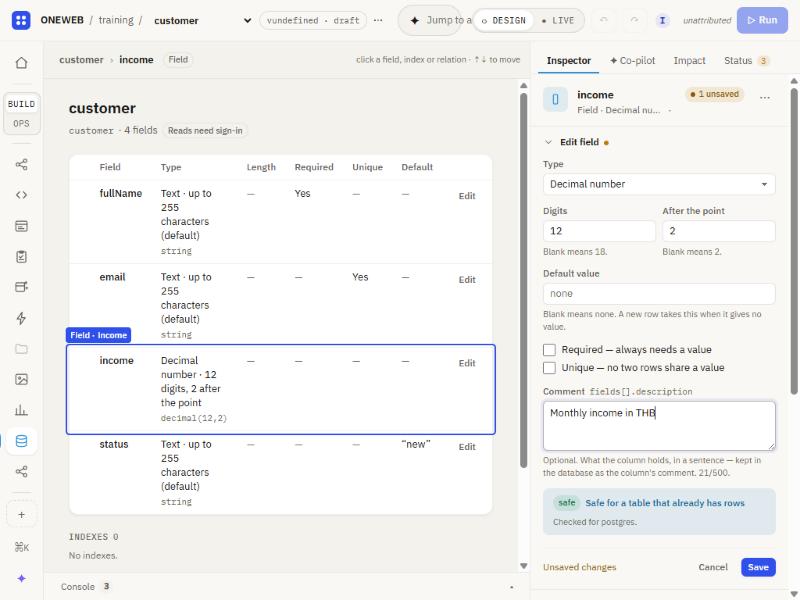
 6. Back in the Data model, click Edit on
income, type a Comment, and read the box that appears under it: safe — Safe for a table that already has rows. Checked for postgres. Press Save.
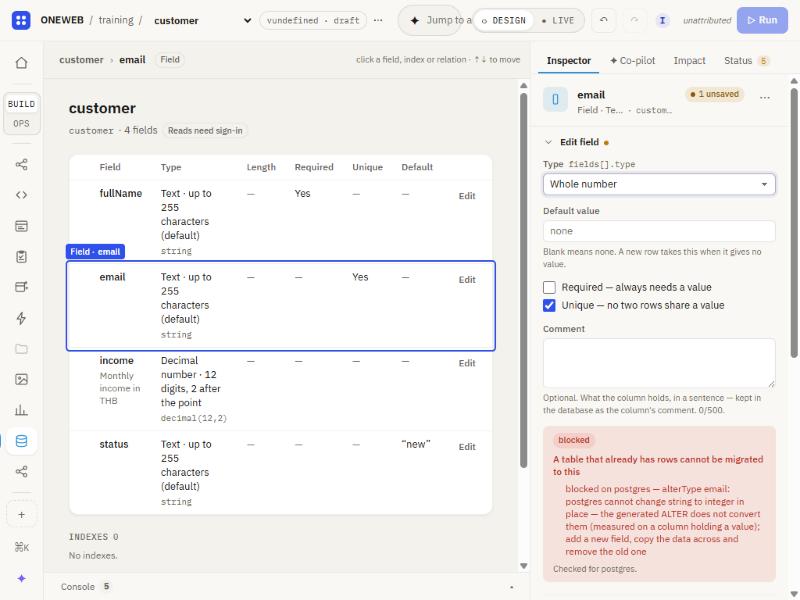
7. Click Edit on email, change Type to Whole number. The box turns red: blocked — postgres cannot change string to integer in place … add a new field, copy the data across and remove the old one. Press Cancel.
 8. Add a Glossary term
customer status with values new, active, closed. A term is bound from a Decision's input or output in the Decision designer, not from an Entity field or a Form widget (this lab only creates the term).
Check questions#
- What do "safe", "unsafe" and "blocked" mean for a field change?
- Where is a number's display format set?
- What does binding a Decision input to a Glossary term change about what the rule compares?
Trainer notes#
Module 5: Logic and process#
Key points#
- Process: start/end events, user tasks (with a Form), service tasks (call a Flow), gateways, lanes, work parties (roles that hold tasks), SLA, stages.
- A service task can present only an API key, so a flow with oauth2 gets an engine-facing "door".
- Decision: inputs, outputs, a FEEL table with a hit policy, tests; rule templates give a form for common conditions.
- Governance: bind to Glossary terms, hit rates and drift, champion/challenger, four-eyes approval.
- The entry Form needs the case-correlation field (
bpmInstanceId); the designer offers to add it.
The Decision is not drawn into the process. The stretch goal (the gateway following the Decision's route) is
(not verified): a gateway's routes carry an expression condition, and a Decision reaches a process through a
service task that calls a Flow; the exact wiring was not checked.
Lab 4 — Approve or review#
- + New (project page, Artifacts tab), Kind Decision, Name
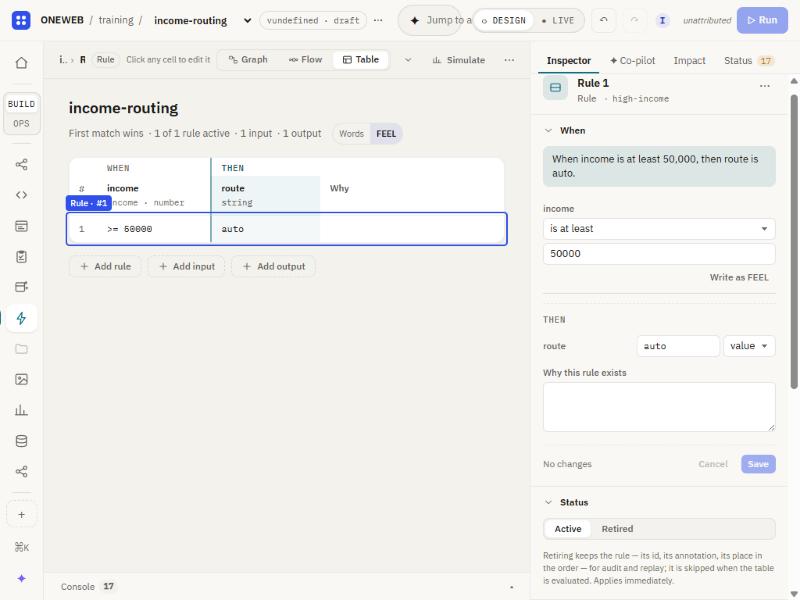
income-routing, Create decision. A new Decision has no inputs and no outputs. Press + Add input: Nameincome, Type number, Add input. Press + Add output: Nameroute, Type string, Add output. The designer opens on the Table view (also Graph and Flow); the Hit policy defaults to First match wins. - Click + Add rule. Give a Rule id (
high-income), under WHEN pickincomeis at least50000, under THEN typeautoin theroutebox, and press Add rule, then Save if the bar shows unsaved changes. Add a second rule for everything else →review. Trap: if you skip the THEN value the rule is added with an emptyroute("—") and nothing is returned. - Click empty canvas so the panel shows the Decision, then under Golden tests press + Add test: a name, a value for
income(60000) and the expectedroute(auto), then Add test. Press Run all. (Run 2026-11-05.)
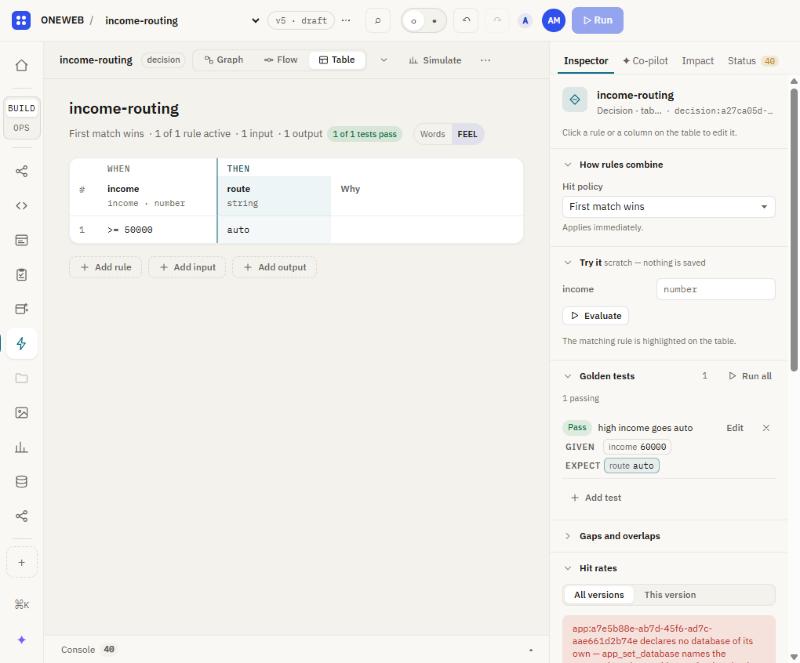
The Hit rates area shows a red note ("declares no database of its own") for an app that has none; that is expected in the lab.
4. + New, Kind Process, Name customer-onboarding, Create process. It starts with a Start and an End and the note "Add the first step". In the right panel open Add a step: Kind of step (User task, Service task, Exclusive gateway, Parallel gateway, End), Step name Enter customer, Add step. Then connect: drag from a step's dot to the next step's dot (Start to the task, the task to End). (Run 2026-11-05: both drags created the routes.) Add a gateway and two user tasks ("Auto approve", "Manual review") the same way if time allows.
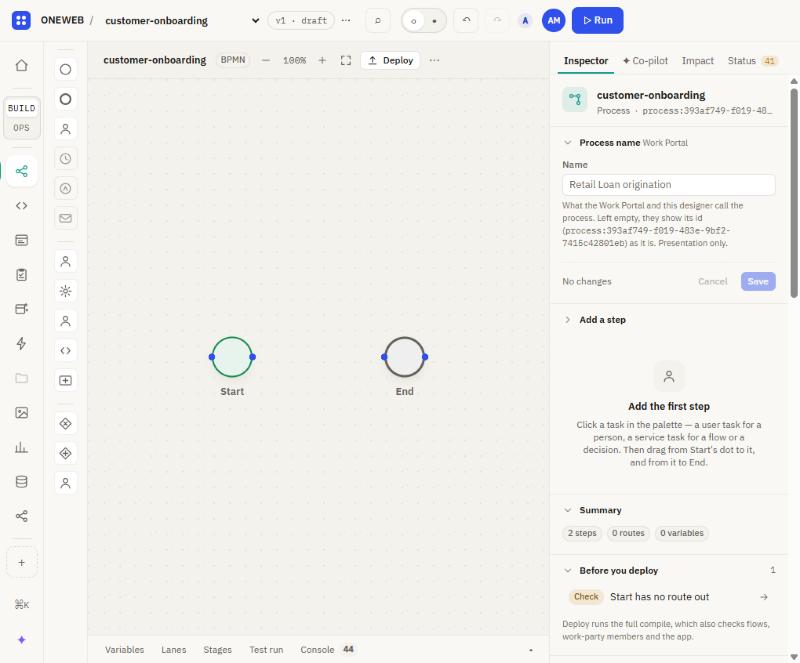
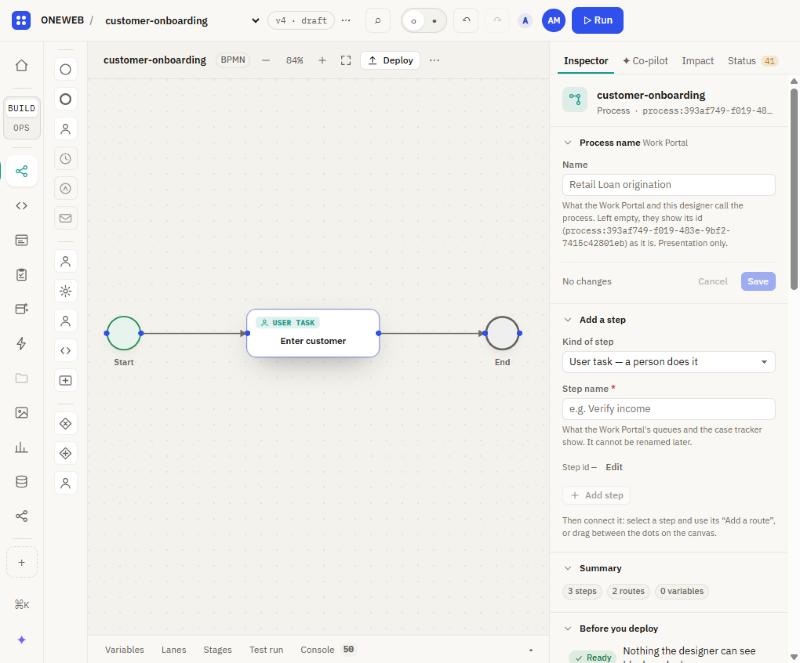
- Work parties, the Form on a task and the case-correlation field were not exercised yet. If the designer offers Add the correlation field, accept it.
- Read the inspector's Before you deploy list; with Start and End connected through one task it reads "Ready".
Check questions#
- What is a work party?
- Why can't a service task call an oauth2 flow directly?
- What does a decision test protect against?